
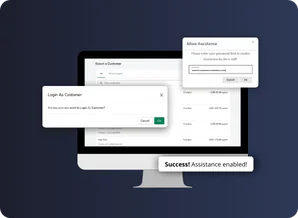
 Live Demo
When customers have difficulties placing an order or preparing a shopping cart, the last thing they want is to wait. Since sharing login data is not an option you have to figure out a way to log in as a customer in Shopify without it.
And Shopify makes that possible with their Multipass feature, but only for the Shopify Plus users.
Yet, you can still log in as customer in Shopify with other plans. You just need the Magefan app — .
Not only does it work with all Shopify plans, but all account types including legacy and new customer accounts.
So, in this guide, you'll learn about the various options it offers.
General Settings
Before we jump to different Shopify accounts and ways to log in as a customer, let's complete a few general app settings. For that, navigate to Apps > Magefan Login as Customer > Configuration.
In the Logged In As Message section, decide whether to enable the "You are logged in as ..." banner.

It will be displayed on the storefront, showing support agents which customer accounts they are working with. This improves navigation and assists support agents in working efficiently.
Another option you'll benefit from is the Shopping cart sharing. Shopify doesn't offer this functionality out of the box, so even customers themselves cannot view their shopping carts from different devices.
The Login as Customer app enables two-way cart sharing. Thus, you can prepare shopping carts for your customers to help them process orders smoothly. Moreover, you can review the carts customers created themselves and assist if necessary.
Note: Initially, a customer would need to re-login to see the cart that the support agents prepared to synchronize the cart identifier. All further cart changes for the current session will be visible for both the support agents and customers.
Shopify Login as Customer: Legacy Accounts
Although Shopify encourages people to use new customer accounts over legacy, the latter is still commonly used. Depending on the Shopify plan, Shopify Login as Customer app offers you different login options.
Note: Magefan app doesn't require you to use Shopify Plus. If you use other Shopify plans, just use other login options.
Direct Login
If you use Shopify Plus, there is the Multipass feature that allows you to maintain one database of users, integrating them from external sources.
In other words, it allows customers who are logged into your external website to log in to your Shopify store automatically.
That's also what allows you to log in as a customer from the Shopify admin. But before that, you should retrieve your Multipass.
For that, navigate to Settings > Customer accounts and scroll down to the Legacy customer accounts section. There, just enable it and copy the Multipass Secret.
Then go to Apps > Magefan Login as Customer > Configuration and paste the Secret in the corresponding field.
Once the Multipass secret is configured, find a customer you want to log in as under Magefan Login as Customer > Customers.
Then, confirm you want to log in to a customer account.
Once you do that, you'll be redirected to the customer account on the storefront with no password or other login information required.
Password Reset
As we've already said, if you don't use the Shopify Plus plan, you can still log in to your customer account without a password.
The fastest option to do that is to reset customer's password. It grants you instant access to the customer account.
Once you choose that option, just confirm you want to log in, and that's it. You'll have access to a certain account.
Note: since customer's password is reset, you'll have access to it as long as the customer doesn't reset the password. After that, you'll have to reset it again to log in.
Assitance Request
If you don't want to reset customer's password, you can simply ask them to grant you access to their accounts through the Allow assistance option.
Just ask customers to log in to their account and find the Allow assistance option under the Account details.
All they have to do to grant you access to their account is just enter a password.
Note: this access is granted for 30 days. After this time expires, customers will have to allow assistance again.
To ask customers to allow assistance, you might send them short instructions on how to do that. Here's an example you can use:
Hello,
Could you please grant access so we can log in to your account to help?
To allow assistance to our store managers:
- Log in and visit your account page.
- Press the Allow Assistance button under the Account Details account (screenshot).
- Enter your account password to confirm you allow us to assist (screenshot).
- Once you enter your password you'll see a notification about a successful operation (screenshot).
- Then let our managers know that the access is granted so we'll be able to assist you.
"Incorrect Password or Login"
If you use Reset Password or Assistance Request as a login method, you may face the "Incorrect password or login" issue. It appears right after you're redirected to the login page instead of a customer account.
It happens for two reasons: the allowed assistance period expired, or the customer just reset their password. Just reset the password again to log in, or ask customers to grant you access again.
Shopify Login as Customer: Customer Accounts
Since legacy accounts are password-based, the login options we've described are all connected to the passwords. In new customer accounts, including B2B, the login is a little different.
So, to log in as a customer in Shopify from the admin, you need to take different steps.
Here, you can use the app's temporary email or your private email to log in as a customer.
We'll explore both options in closer detail moving forward.
App's Temporary Email
The app generates a unique temporary email you'll use to log in. This email is valid for a specific period, which you set in the app settings.
So before we begin the login process, go to Apps > Magefan Login as Customer > Configuration > New Customer Account and set the New Email Lifespan (in minutes).
Then navigate to Apps > Magefan Login as Customer > Customers and find a customer you'd like to log in as.
Once you click on it, a pop-up with detailed login instructions appears. Although all the instructions are already there, we'll guide you through the process.
Copy the unique Email and hit Sign In. It opens a new tab with the login form.
Paste the copied email in the corresponding field and click Continue.
Go back to the admin panel and copy the 6-digit code you receive there.
Once again, paste the code in the corresponding field on the login tab and Submit the form.
That's it. You're in the new customer account.
Note: the app overrides the customer's login email temporarily. So if you want to work on your customer's account simultaneously with the customer, just share the email and code you've just received with them.
Order Confirmation Email
At this point, you may ask: Who will receive the confirmation email if the app temporarily changes the customer's email ID? The Login as Customer app has you covered as well.
It provides you with an option to send confirmation emails to the original customers. You can enable it in Apps > Magefan Login as Customer > Configuration > Order confirmation email sending.
Additionally, you can connect your private SMTP instead of Magefan's one to send order confirmation emails. All you have to do is fill out the listed fields with the SMTP credentials and save the settings.
Private Email
The scenario described above is a workable solution that allows you to log in to new customer accounts. Still, to make it work, you have to use the app's temporary email. Yet, if you have strict security measures in place, this may be a deal-breaker.
Fortunately, the Login as Customer app offers an alternative solution and allows you to use your private email to handle customer login codes.
To set it up, navigate to Apps > Magefan Login as Customer > Configuration > Customer accounts (non-legacy) and unfold the Private Email tab. Here, you need to enable the option and enter your private email ID and Google app password.
We suggest creating a separate inbox to only handle customer login codes for better security and more effective processing.
Note: Your Gmail credentials are saved in an encrypted format in our database, and the app deletes emails after reading them for security purposes.
Once you complete the app's settings, there are a few tweaks to make on the Gmail side. Firstly, create two custom labels — Login Codes and Order Emails.
Then, go to Settings > Filters and Blocked Addresses and create two new filters.
The first filter will detect emails that have the word "code" in the subject and apply the Login Codes label, while skipping the inbox and spam folders.
Note: If you manage your store not in English or in more than one language, add the corresponding translations of the word "code" to the filter. For example, (* (code OR koda OR kod)).
Similarly, the second filter should process the emails with the word "confirmed" in the subject and apply the Order Emails label to them, skipping the inbox and spam folders.
This second filter is necessary to send the confirmation emails to real customer emails, and not the temporary email you use to receive the login codes.
At this point, you are all set, and the app will use your private email to receive the login codes, read them, and log you in as a customer. The workflow will be the same as with the app's temporary email.
Track Logins to Customer Accounts
Regardless of the account types or methods you use to log in to them, you can still track every login made for safety reasons.
There are a few options for that. But let's start with the basics.
Recent Logins
All recent logins are stored in the Recent Logins tab. Just navigate to Apps > Magefan Login as Customer > Recent Logins to see a list of customer accounts admins recently logged into.
Customer Accounts
The other option is available for Shopify Plus users only. It allows you to track admin users who logged into customer accounts directly in the Shopify customer account.
For that, you need to enable the Login Log in the app settings. Go to Apps > Magefan Login as Customer > Configuration and enable a corresponding option and paste the Admin Api Access Token.
This will enable admin user tracking within customer accounts.
Admin Users Logged In on Frontend
If you want your admin users to place orders on behalf of customers in Shopify, you can adjust the purchasing journey for them. One way to do that is by displaying custom fields or collections for admin users who logged in as customers on the frontend.
But to achieve that you need to track who's logged in: admin user or a customer. We do that using the specific cookie value for the admin user — mf_lac_logged.
Use the following function to check if this cookie value it set:
function isMfLacUser() {
        let name = 'mf_lac_logged=';
        let decodedCookie = decodeURIComponent(document.cookie);
        let ca = decodedCookie.split(';');
        for(let i = 0; i <ca.length; i++) {
            let c = ca[i];
            while (c.charAt(0) === ' ') {
                c = c.substring(1);
            };
            if (c.indexOf(name) === 0) {
                return c.substring(name.length, c.length);
            }
        };
        return '';
    }
When the mf_lac_logged cookie value returns, you'll know it's the staff member who is logged into the customer account. Then you can display any custom content for them to improve the purchasing journey.
But that's not it.
The opportunities to log in as a customer in Shopify extend beyond the admin panel. You can also use the Login as Customer API to track orders placed by admins in the order view page and place orders for customers from other CRMs or helpdesks.
It significantly improves customer experience and makes your support team work more effectively.


