

 Live Demo
Magento 2 Blog Extension | SEO-optimized Blog for Magento
Magento 2 Blog Extension is the best Magento blog module that offers an extensive set of tools for blog management, design, SEO optimisation, and product promotion. It allows you to create blog posts, categories, tags, authors, edit and reply to comments, manage blog SEO, configure blog navigation sidebar, use 22+ blog templates and layouts, add related posts and products, import your blog to Magento with 10+ import tools, create posts with an AI writer and configure multiple other blog elements.
Magefan Blog works for Magento Open Source and Adobe Commerce, is integrated into 10+ of the most popular Magento themes, and is compatible with the majority of themes, including Hyvä and Breeze. This extension has crossed 2 million downloads and is used by 10,000 active stores.







All You Need to Manage Magento Blog in One Place
Magefan Blog is the only that offers you every tool you need to start blogging in Magento without relying on any third-party platform. It offers everything from posts, authors, tags, comments management, sidebar navigation, SEO, extended design settings and scheduling options. All within one blog module.

Manage all Blog Content from One Panel
Create a blog in Magento with every related page through page builder or WYSIWYG editor using this Magento 2 Blog Extension.
- - Blog posts - create content, add contents, assign authors, set layouts, disable comments, add featured images, configure metadata.
- - Blog categories - assign or remove posts, set category sorting and display modes, add top and bottom descriptions, set up SEO.
- - Blog tags - set layouts, change templates, configure metadata.
- - Blog authors and co-authors - create author pages and bios with socials, add one or multiple authors per post.
- - Blog comments - collect, edit, approve, reject and reply to blog comments with Magefan.
Create and Publish Faster with Blog Management Tools
Spend less time creating and publishing your blog in Magento with multiple built-in management tools:
- - Schedule - set a future date and time to publish blog posts even when you’re not around.
- - Preview - draft posts, categories, tags and author pages and check them on the frontend before publishing.
- - Duplicate - copy blog posts and categories to fill out settings by default and don’t start from scratch.
- - Auto-disable - remove seasonal posts automaticallyat a specific time and date.
- - Auto-save - write safely without losing progress with automatic saving at specific intervals.
Edit and Customize Magento Blog Design
Magefan Blog for Magento offers complete design flexibility and multiple blog layouts that look great on any device: desktop, tablet or mobile.
Choose from 22+ professionally designed Magento blog templates, and personalise layouts for each blog page: post, category, tag, author.
Create an engaging blog homepage using multiple templates and widgets. Or use custom CSS to adjust the design on specific pages or across your entire blog.
Improve Engagement with Related Posts
Make visitors stay longer and increase their time on the website with relevant related content in multiple website areas.
- - Add related posts manually or automatically - under blog posts, within post content and on related product pages.
- - Add relevant content across website - add recent or featured blog posts to homepage, catalog or CMS pages via widgets.
- - Add posts by author or category - use separate post sections to show relevant content by author or category.
Keep readers scrolling and stay active longer with Magento 2 Blog Extension.
Sell Through Your Blog with Related Products
Magento Blog Module helps readers discover your products naturally while they read your blog.
Assign related products to posts manually, automatically or via rules and show them under/within each blog post, or in the sidebar.
Relate blog posts with products and show related content directly on product pages to boost sales and support purchasing decisions.
Edit, Approve, Reject, and Reply to Comments. Safely.
This Blog Extension in Magento 2 supports three comment types — native Magefan comment, Facebook and Discuss and comes with built-in comments reCAPTCHA.
Collect, moderate, approve, reject and reply to comments directly from the admin panel.
Enable comment notifications for admins and users, set default comment statuses and disable guest comments to protect from spam and stay updated.
Add Blog Sidebar for Navigation
Improve navigation in your blog and help people find what they need faster with Magento 2 blog sidebar widgets.
Add category tree, different posts, archive, tags, related products, post contents, authors list and custom HTML banners to the sidebar.
Enable blog search or add integration with catalogue search to help people find content even outside your blog.
Control Who Sees and Works with Your Magento Blog
Protect your Magento 2 Blog from unauthorised actions and personalise visibility for different customer groups.
- - Restrict blog access - limit who can view, edit, save and delete posts, categories, tags and authors.
- - Limit frontend visibility - display certain posts and categories to specific customer groups.
Improve Visibility with Built-in Magento 2 Blog SEO Features
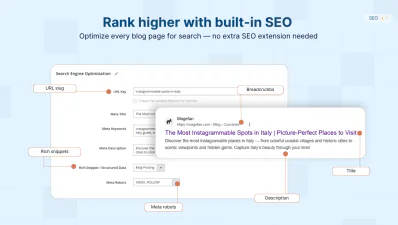
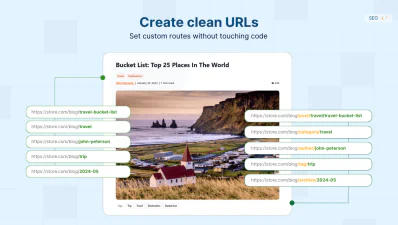
With the Magento Blog Extension, you don’t need a separate SEO module since it already covers all SEO aspects from blog XML sitemap, URLs, and redirects to meta robots, rich snippets and canonical tags.
SEO-Friendly Magento Blog URLs and Pagination
Extended Indexing and Crawling Settings
Search and AI Visibility Options
Built-in Blog XML Sitemap
Magento 2 Blog Extension That Boosts Engagement
Magento Blog module offers extended blog post features to keep your readers engaged while reading: post views, average reading time, post contents, reading progress bar, social sharing buttons and multi-language support for global traffic.
Improve Reading Experience
Keep users engaged and boost their browsing experience with multiple Magento blog elements:
- - Post contents - allow users to navigate through your blog posts faster.
- - Average reading time - show how long a post is directly on categories and post pages.
- - Post views - count post visits automatically or set the number of views manually.
- - Reading progress bar - let user track their reading progress.
Enable Social Sharing
Extend your reach and attract new audience for free by enabling the social sharing buttons on each blog post.
Magento 2 Blog Plugin allows you to enable sharing to Facebook, Twitter (X), LinkedIn, Pinterest, BlueSky or just add the “copy link” button.
With the built-in OG tags, your blog posts will look attractive on every social media or messenger it’s shared on.
Target More Regions with Multi-language Magento Blog
This Magento 2 Blog supports multi-store setup for posts, categories, tags, and authors pages, allowing you to target more languages within the same blog.
No need to create separate entities. Just use a convenient store switcher to translate your blog pages and assign them to different store views.
Drive global traffic and open more engagement opportunities with no extra tools.
How to Import Blog to Magento 2?
If you’re managing a blog on WordPress, HubSpot, other blog extensions in Magento or CMS, you can easily migrate to Magefan Blog using 10+ built-in blog migration tools or request a Magento Blog Migration Service.
Import from WordPress to Magento
Import from other blog module
Import from other CMS
Extend Beyond One Blog Extension for Magento
Magento Blog Extension is designed to serve different content needs, including second and third blogs within the same frontend and even a PWA Blog for headless storefronts.
Magento 2 PWA Blog
Magento 2 Second Blog
Magento 2 Third Blog
Magento Blog Module Free Version
Magefan Blog comes in three pricing tiers: Basic, Plus and Extra with different feature ranges, management tools and SEO options. However, we also offer a free Magento blog module version — all versions before 2.13.0 are free to download from GitHub repository for testing or development purposes.
FAQs
What is the best extension create blog in Magento 2?

Does Magento 2 have a blog?
How does a Magento 2 blog extension improve SEO?
Can I migrate WordPress blog to Magento 2?
How do I use the Magento 2 blog module?
The setup is relatively easy since the majority of blog settings (templates, layouts, pagination, URLs, XML sitemap, etc.) are already pre-set, so you just need to tweak the options to your needs. However, you can get right to creating blog posts after installation.
What is the difference between Magefan Blog pricing tiers (Basic, Plus and Extra)?
Blog Basic is the essential blogging package that includes everything you need to manage a blog on Magento: posts, categories, tags, comments, related posts & products, sidebar social sharing, and technical SEO options for your blog (XML sitemap, rich snippets, breadcrumbs, metadata.
Blog Plus packages come with an automation layer and advanced SEO options: automatic related posts and products, more advanced SEO URL settings for every blog page, automatic 301 redirects, extended XML sitemap settings, customer group targeting, more flexible scheduling and editing tools.
Blog Extra offers extensive design and management settings along with the AI integration: 22+ blog templates, AI blog writer, slider template for related content, advanced author profiles, drafts auto-saving options, custom blog homepage (built with widgets), blog comments notifications, catalogue search integration, and multiple blog post engagement tools.
Is Magefan Blog compatible with Hyvä Theme, Hyvä CMS and Hyvä Commerce?
Blog Module is compatible with Hyvä Theme, Hyvä CMS and Hyvä Commerce out of the box in Plus and Extra plans. To add Hyvä compatibility, requires the following packages, depending on your plan:
magefan/hyva-theme-blog-plus

magefan/hyva-theme-blog-extra
You can also install additional package:
magefan/hyva-theme-blog-tailwind-jit

magefan/hyva-theme-blog-liveview-editor
Does this Blog plugin support REST API or GraphQL endpoints?
Is Magento Blog add-on mobile-friendly?
Is this Blog module compatible with Magento Page Builder?
Feature Highlights
Blog templates
ExtraAdvanced blog URLs & redirects
PlusBlog authors, co-authors and lists
ExtraBlog SEO settings
AI blog writer
ExtraBlog comments
Related content automation
PlusSidebar navigation
Catalog search integration
ExtraRelated posts & products
Auto-save & auto-disable
ExtraCustomer group restrictions
PlusAdvanced XML sitemap settings
PlusBlog import tools
Blog management tools
Advanced related posts
ExtraAccess control list
PlusBlog store switcher
ExtraLooking through the ways to upgrade your store? Start a blog and make your website stand out. We'll help you on your journey to professional blogging in eCommerce.
