

 Live Demo
Magento 2 Rich Snippets | Magento Structured Data
Magento 2 Rich Snippets is the extension that automatically generates schema markup for Magento products, categories and other pages to make them eligible for Google Rich Results and AI search citation. It supports 9 schema types, including product schema, organisation and category markup, breadcrumbs, searchbox, FAQ, HowTo, Events structured data and generates video markup automatically.
This Magento Structured Data tool helps search and AI crawlers understand your pages correctly through multiple details marked in a machine-readable format. It increases your chances of appearing in Google rich results and AI-driven tools like Google AI Overviews, ChatGPT, Perplexity, Claude and Gemini.
Magefan Rich Snippets is part of the .







Why Do You Need Google Rich Snippets in Magento?
Magento covers basic structured data for product pages only, which is not enough for full eligibility with Google Rich Snippets, Google Shopping and accurate AI citations.

Improved search visibility
Better AI visibility
Improved visibility in Google Shopping
Improve Product Visibility with Magento 2 Rich Snippets Suite
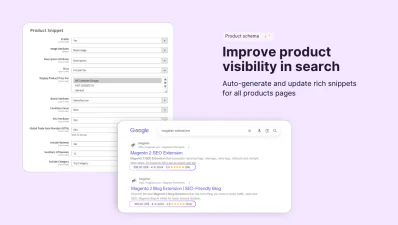
Magefan Rich Snippets Extension for Magento generates and updates product schema with all important product details — prices, availability, reviews, and ratings, shipping details, condition, certification and more — across your entire catalogue automatically.
Generate Product Schema in Magento Automatically
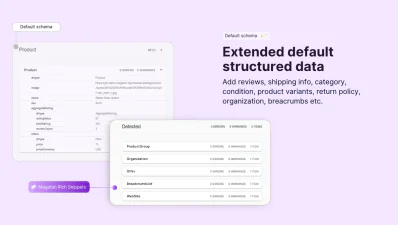
Extend default Magento structured data for products with various details without any tagging or manual set-up. Magento 2 Google Rich Snippets generates and updates product schema across your entire catalogue automatically.
- - Product prices - current price (including or excluding tax).
- - Product availability - in stock and out of stock.
- - Product reviews - review title, body, rating, author and count.
- - Product category - include all, deepest or top category.
- - Product brand - product attribution for search and AI systems.
Add Advanced Details to Product Schema
Strengthen your Magento product schema with advanced product details to become more eligible for extended Google rich results:
- - Shipping info - country, price, branding time, delivery time and free shipping.
- - Product condition - new, used, refurbished, or damaged (or any product attribute).
- - Product certification - name, code, authority and URL.
- - Custom product attributes - add any Magento product attribute to schema properties.
Add Configurable Product Variant to Schema
Generate and update structured data for each configurable product automatically.
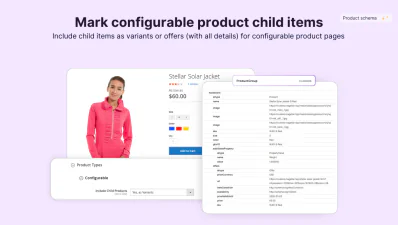
Magento 2 Rich Snippets Extension allows you to add configurable product child items as variants or offers with unique variant details.
Become eligible for Google rich results with variant-level data: names, links, images, prices, SKUs, identifiers, conditions, size, colour availability and shipping details.
Enable Merchant Return Policy Schema
Include your return policy in product, organisation, or offers structured data to let Google and AI crawlers know about the return windows and conditions your offer.
Set return countries, category, window, fees and methods and mark them explicitly in the Magento schema markup.
Magefan Rich Snippets extension will apply this data across the markup type you selected automatically.
Support all Types of Schema Markup in Magento
Magefan Google Rich Snippets solution adds schema markup across your entire catalogue, so categories, breadcrumbs, organisation, FAQs, videos and other content pages are properly marked for rich results and AI retrieval.
Create Rich Organisation Schema
Strengthen your brand authority and become eligible for the Knowledge Panel on the search results page using organisation schema in Magento. Help search engines and AI tools identify and describe your brand correctly.
Magento Rich Snippets Suite marks your business details with structured data and adds them to the homepage or across all pages:
- - Description
- - Logo
- - Social media links
- - Contact information (fax)
Add Category Schema in Magento
Help search engines display your product collections directly in search results and understand your site structure.
Enable category schema for Magento categories and help robots surface more of your catalogue.
- - Category snippet - Product: defines every item on the category page with price, review, availability, and other details.
- - Category snippet - ItemList: organised multiple items in a collection order with URL and optional name, image data.
Enable Breadcrumbs Schema
Magento 2 Rich Snippets Extension generates schema markup for breadcrumbs and updates it accordingly to reflect your site’s navigation.
Mark default Magento breadcrumbs with schema on product, category, CMS, blog and other customer pages.
Help Google display a user-friendly navigation path in search results instead of a raw page URL.
Add FAQ Markup to Products, Categories and Custom Pages
Although Google has deprecated FAQ question-and-answer accordions from search results, FAQ schema in Magento still matters for AI crawlers looking for well-structured answers.
Use Google Rich Snippets for Magento to automatically generate FAQ page schema markup on product, category, blog, CMS and any other pages.
Use the extended FAQ schema widget, fill out questions and answers and let the extension mark them up for AI visibility and retrieval.
Guide Crawlers with HowTo Structured Data
Magento Rich Snippets make your content eligible for rich results and AI search tools generating replies for "How do I fix X?" queries.
Use HowTo structured data in Magento to mark your guides in a machine-readable format, including step-by-step instructions, cost, time, tools, and supplies.
This helps traditional and AI search crawlers identify content blocks as sequential guides rather than generic content.
Mark Your Events with Events Schema
Magento structured data for events helps more people discover your events through dedicated Google event carousels or AI overviews.
Add Events schema markup with multiple details for extended and more targeted event search:
- - Name and description
- - Start and end dates
- - Type and mode
- - Location details and address
- - Organizer details
- - Images
- - Offers
Enable Video Markup Automatically
Generate video structured data in Magento to provide product video details — such as name, link, duration, upload date, and thumbnail — for search engines and AI search tools.
This helps them part nd cite your video content more accurately and makes product pages richer.
Magento 2 Rich Snippets Extension automatically generates video structured data for every video you upload to product pages. So you don’t have to do anything.
How to Add Rich Snippets to Magento Pages?
You don’t need a developer to add structured data for Magento product, category, and other pages with the Magefan Google Rich Snippets tool. Here’s a quick overview of the rich snippets setup guide.
Step 1: Install Magefan Rich Snippets for Magento
Step 2: Configure schema markup for Magento pages
Step 3: Validate structured data
FAQs
What is the best extension for rich snippets in Magento?

What markup types does this Magento Rich Snippets Extension support?
What structured data Magento covers by default?
Does Magento Google Rich Snippets extension automatically generates schema for reviews?
What markup schema will include all products in category?
Can I configure an unlimited number of attributes to be added to the Magento structured data?
How can we set a specific country for the merchant policy property?
Does the extension generate FAQ schema automatically if a page has an FAQ section?
Is it possible to show configurable products as a parent group and variants with this extension?
Schema Markup in the Magento Rich Snippets Extension
Product schema markup
Review and rating snippets
Breadcrumbs markup
Organization schema
FAQ schema support
Category page snippets
Events structured data
HowTo markup
Video rich snippets
Rich snippets can significantly increase your click-through rates and boost visibility in search results. They help you to stand out in search and drive the attention of the targeted customers.
