

 Live Demo
Magento 2 Facebook (Meta) Pixel Extension | Conversions API (CAPI)
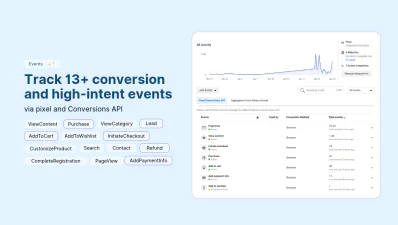
Magento 2 Facebook Pixel (Meta Pixel) Extension is a data tracking tool that allows merchants and marketers to add Facebook Pixel and Conversions API to Magento via the admin panel, without any theme editing or script management. It automatically tracks conversion and lead-generation events — PageView, ViewCategory, ViewContent, CustomizeProduct, AddToCart, AddToWishlist, InitiateCheckout, AddPaymentInfo, Purchase, Refund, Lead, Contact, Search, CompleteRegistration — via both browser (pixel) and server- side (CAPI) tracking.
Magento Facebook Pixel module uses advanced matching, event deduplication, catalogue matching, and customer data protection to ensure data tracking is reliable, fast and GDPR compliant. Fully compatible with and .







Why Do You Need Facebook Pixel in Magento?
To optimise Facebook and Meta Ads and create better retargeting and remarketing campaigns, you need valid data about your store performance. Facebook Pixel Module for Magento collects and sends data about customers' behaviour, product and checkout performance directly to the Facebook Ads Manager.

Track Catalog Performance
Monitor Checkout Performance
Track Customers' Behaviour
Track Data Reliably with Magento 2 Facebook Pixel Extension
Magefan Facebook Pixel Extension covers browser and server-side tracking for Facebook, tracks data only after the user’s consent (if needed) and defers pixel script loading, so the data reaching Facebook Ads Manager is reliable, compliant and fast.
Add Facebook Pixel Code Without Coding
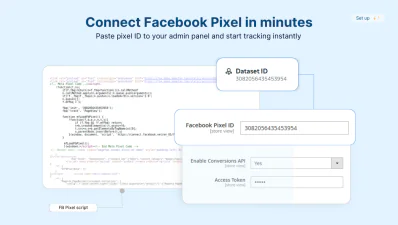
Magento Facebook Pixel extension allows you to add pixel code across all your website pages, without theme editing or tracking script management.
Paste Facebook Pixel ID directly into the admin panel and the extension handles the rest.
Start tracking data for Facebook Ads in minutes, not hours.
Improve Tracking with Facebook Conversions API
Don’t let ad blockers and browser restrictions stop conversion data from reaching Facebook Ads Manager.
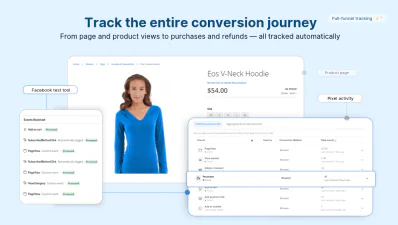
Integrate Facebook Conversions API with Magento in a few clicks to bypass pixel tracking limitations. Use the built-in testing tool to check Conversions API integration directly from the admin.
Use Facebook server-side tracking for reliable conversion data.
Track 13 eCommerce Events
Magefan Facebook Pixel module for Magento tracks 13 conversion and lead-building events to help you see the entire customer journey from page view to purchase.
- - Catalogue browsing: PageView, ViewCategory, ViewContent, CustomizeProduct
- - Purchase intent: AddToCart, AddToWishlist
- - Checkout and conversion: InitiateCheckout, AddPaymentInfo, Purchase, Refund
- - Engagement: Lead, Contact, Search, CompleteRegistration
Delay Facebook Pixel Script Loading
Enable Facebook Pixel script loading without hurting customer experience.
Magento 2 Facebook Pixel delays script loading until users’ first interaction with your store: click, scroll or mouse touch.
This keeps your pages fast without losing any data tracking accuracy.
Stay Compliant with Cookie Consent
Stay compliant with GDPR, CCPA and LGPD when using Facebook Pixel in Magento.
Enable customer data protection in the Magefan Meta Pixel module to fire pixel and Conversion API events only after visitors accept cookies.
Avoid any legal risks while tracking insights for Facebook Ads.
Track Data for All Store Views Separately
Create microsegments in Facebook Ads Manager instead of pulling all data into one dataset.
Assign different Facebook Pixel IDs per store or per store view to analyse and target each audience independently.
Create even more personalised Facebook campaigns and target people with unique offers.
Optimise Meta Ads with Seamless Facebook Pixel Integration
Facebook Pixel Magento Extension automatically handles event deduplication, catalogue matching and advanced matching to make sure only clean and detailed data reaches Facebook Ads Manager.
Receive Only Valid Data with No Duplication
Avoid event duplication when using both Meta Pixel (browser) and CAPI (server-side) tracking in Magento.
The Magefan Extension applies event deduplication to match and merge identical conversion events.
Make sure Facebook Ads Manager counts each tracked action only once.
Gather More Customer Data with Advanced Matching
Create bigger and more accurate custom audiences for retargeting with Meta (Facebook) Ads.
Magento Meta Pixel Extension enables automatic advanced matching to improve tracking.
Collect more customer details — like email, phone and location — securely and see the real impact of your ads.
Track Each Product Correctly with Catalogue Mapping
Power catalogue and Dynamic Product Ad campaigns on Facebook with valid product details.
Map Magento product attribute identifiers, prices and categories to the fields Facebook expects so each product is tracked properly.
Use Facebook Pixel tracking in Magento to match Meta Commerce Manager catalogue and optimise your ads.
How to Add Facebook Pixel to Magento 2?
Add Facebook Pixel ID
Connect Conversions API
Track valuable data safely
What Data Layer Parameters Does Magento Meta Pixel Track?
Order
- content_ids
- content_name
- content_type
- contents[].id
- contents[].quantity
- currency
- num_items
- value
Product
- content_id
- content_ids
- content_category
- content_name
- content_type
- contents[].id
- contents[].quantity
- currency
- value
Customer
- em (email)
- fn (first name)
- ln (last name)
- ph (phone)
- db (date of birth)
- ge (gender)
- ct (city)
- st (region)
- zp (postcode)
- country
- external_id
Frequently asked questions about the Magento 2 Facebook Pixel
Can I have different Facebook pixels for each store/store-view/website?

Note: you can keep the same Conversions API across all store views, stores, or websites since the data will be sent to an assigned dataset (Pixel ID) in Facebook Ads Manager.
Does this Facebook Pixel extension work with Facebook Commerce Catalog?
To set up Facebook Catalog, you need to create a Facebook Product Feed. At this time, you can use the Magefan Google Shopping Feed that generates product feeds in a format Facebook requires.
How many Facebook pixel codes can you have in Magento?
How to install Facebook Pixel in Magento?
Alternatively, you can upload an extension archive to your Magento folder and run the composer update commands:
php bin/magento setup:upgrade
php bin/magento setup:di:compile
php bin/magento setup:static-content:deploy
Does Magefan extension add a Facebook tracking pixel on AddToCart and Purchase events?
Can Magento track Facebook Ads conversions automatically?
How do I test if Facebook Pixel works in Magento?
Why is Facebook Pixel not tracking conversions in Magento?
Key Features
No-code Facebook Pixel integration
Facebook Conversion API
ExtraAdvanced conversion events
PlusServer-side tracking
ExtraAdvanced Matching
PlusBasic event tracking
Client-side tracking
GDPR compliance
Customer interaction events
ExtraExtended customer data
PlusEvent deduplication
ExtraSpeed optimized loading
- Samples
- Facebook Pixel v3.0.1
