
 Live Demo
Magento 2 WebP Images Extension | WebP Support
Magento 2 WebP Images Extension is a robust image optimisation solution that offers you automatic, hands-free WebP conversion, full coverage, and flexible tracking dashboard.
Select a conversion method, control compression levels, and define what images to convert to WebP in Magento — we’ll do the rest. Or do it your way and upload your pre-converted WebP images to the admin.
Reduce file size up to 50% without compromising quality or doing more than a few clicks. Speed up your store with a Magento 2 WebP Images solution built to scale.







Benefits of the Magento 2 WebP Images Extension

Complete automation
Zero maintenance
Full control and monitoring
Features of the Magento WebP Extension
WebP extension makes image optimisation fast, convenient and error-free through a variety of features
Speed Up Your Magento on Autopilot
Magento speed optimisation is a work in progress. But you don’t have to spend hours converting GIF, PNG and JPG to WebP.
Save hours on manual work. Let Magento 2 WebP Images Extension run quietly in the background and convert images automatically.
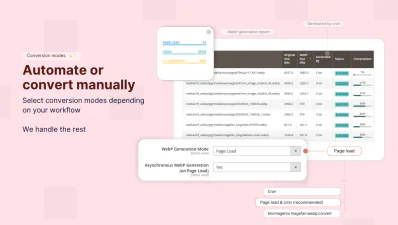
Just select any of the 4 conversion methods and monitor the progress in real-time.
No more schedules and manual updates — Magefan WebP converter does everything for you.
Smaller Images — Same Quality
Deliver fast pages without compromising your store visuals with Magefan WebP Images Extensnion for Magento 2.
Reduce GIF, PNG and PNG file size by up to 50%, keeping WebP copies as vibrant and sharp as the originals.
Stay in full control and choose the compression level that works for you.
Don’t like how the compression turned out? Clear WebP cache anytime and re-convert images in one click.
Deliver Seamless Experience on All Browsers
Not every browser supports WebP. But we won’t let this slow your website down.
Our Magento WebP Images Extension automatically serves WebP images where supported. It falls back on the original PNG and JPG versions for the non-WebP browsers.
Deliver consistent, fast and smooth experiences to all users — regardless of their device or browser.
Improve SEO with Faster Pages
Better SEO brings more visitors, and a fast shopping experience keeps them coming back.
Convert images to WebP to ensure your pages load in a fraction of a second.
This means better Core Web Vitals, higher Google rankings, and more visitors who stay instead of leaving.
Every second counts for SEO and sales. Make speed work in your favour.
No Need for a Developer. You Have Full Control.
Optimise and control image optimisation without any extra help.
Manage Magento WebP Images in a single dashboard and stay updated with transparent reports:
- - Monitor converted and skipped images
- - Track WebP conversion progress
- - View file compression percentage
- - Delete and regenerate WebP files anytime
Not sure if this Magento 2 WebP Images Extension has what you're looking for?
Convert Every Image. Even External.
Magento 2 WebP Images Extension ensures full coverage for all images on your website. PNG, PNG and GIF are just the beginning.
Convert images in sliders, CSS background, page builder, HTML picture tags and even images from external websites.
Optimise every visual for speed and performance to stay consistent across all content.
Your Workflow — Your WebP Images
Full control over Magento WebP Images means you choose how to handle them.
Stay with the automatic WebP conversion for hands-free optimisation or upload pre-converted WebP images directly to the admin.
Magento WebP Extension fits into your existing workflow perfectly.
Future-proof with Flexible WebP Integration
Magefan solutions are built to scale. They evolve together with your store. So does our WebP Extension.
- - Use REST API and GraphQL endpoints to serve WebP to any platform
- - Offer WebP images on PWA websites and third party applications
- - Store and serve optimised WebP images directly from your preferred cloud storage, like AWS S3, for global content delivery (requires WebP Extra plan)
Stay ready for the next-gen eCommerce technology with Magento 2 WebP Images Extension.
Frequently asked questions about the Magento WebP Images Extension
Does this WebP Extension support older Safari (Apple), Firefox or other non-WebP browsers?

So, the extension loads different files for different visitors of the same page — .webp images for WebP-friendly browsers, and original .png/.jpg for browsers that don’t support WebP. No one sees broken images.
Does this module replace the original PNG and JPG images (paths) in the database?
Then, if a user comes from a browser that doesn’t support WebP, the extension loads the original image to ensure a seamless experience on all browsers.
Do I need to make some server and template changes or connect some external services to use this Magento WebP extension?
Can I install your Magento 2 WebP Images module via the composer?
How to start the WebP conversion once I install this extension?
You can change the settings or extend them to the advanced options to optimise the WebP conversion (if needed).
How does WebP conversion happen: by cron or immediately after upload to the admin?
- - Page load — images are converted (e.g. on a certain page) as someone loads a page
- - Cron — our cron searches for and convers all images that haven’t been converted to WebP
- - Page load & cron — combination of the previous two methods
- - CLI command — you trigger WebP conversion for all or specific image folders manually
- - Admin upload — you upload pre-converted WebP copies to your admin panel.
Can I change the WebP image quality and size?
How does the WebP extension know what static or media folders to convert images from?
However, you can specify a folder where you want to convert images from or a folder you’d like to skip from conversion.
Does this WebP Converter work with CDN, Fastly and Magento Cloud?
Does this extension work with the Page Cache and Varnish?
Is getting WebP images for PWA the same as getting the standard product info interface?
Magento 2 WebP Images allow you to improve your website loading speed converting old PNG and JPG images into a modern WebP file format.
