
 Live Demo
Magento 2 AVIF Images Extension | Magento AVIF Support
Magento 2 AVIF Images Extension is an image optimisation tool that automatically converts GIF, PNG and JPG images to AVIF format using 3 conversion modes, quality control, image exclusion rules and advanced AVIF settings. The extension converts images to AVIF format but keeps and shows the original files as a fallback for unsupported browsers.
Magefan AVIF Extension converts any image (picture tags, page builder sliders, CSS, external website images, GraphQL or REST API requests) to a new AVIF image format without any developer assistance.







Optimise Images with a Dedicated Magento 2 AVIF Images Extension
Magefan AVIF Extension for Magento converts your images to AVIF automatically, allows you to control conversion quality, and lets you skip files and folders from AVIF conversion.
Convert Images to AVIF Format Automatically
Optimise images on your Magento store with the modern AVIF format automatically using the Magento 2 AVIF Extension.
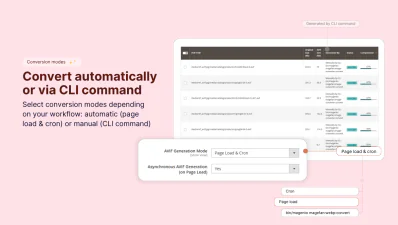
Convert all existing or newly added GIF, PNG, JPG images to AVIF using the conversion mode that suits your server and traffic needs best:
- -3 conversion modes - choose how to convert images: on page load, by cron, via CLI command or page load & cron.
- -Asynchronous AVIF generation - convert images when the page is requested, without slowing down user experience or blocking page rendering.
- -Parallel conversion processes - run multiple conversion processes at once to generate AVIF images faster for large catalogues.

Control AVIF Image Size and Quality
Balance file size and quality with the AVIF images quality settings.
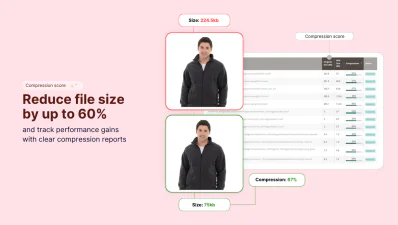
Reduce file size up to 50% while keeping your images sharp and detailed.
Just set the compression level and let the Magento AVIF Images Extension convert images according to your needs. You can change the settings any time and reconvert images through the AVIF dashboard.
Fall Back to Original PNG and JPG Files
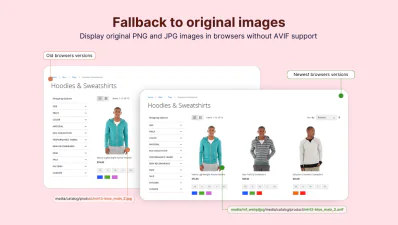
Magento 2 AVIF Images Extension doesn’t delete or overwrite your original images. It generates AVIF files as copies for browsers that don’t support AVIF.
Your original PNG and JPG images are automatically served to visitors in those browsers, while everyone else sees AVIF.
Use the picture tag for AVIF images to ensure a seamless browsing experience for all visitors regardless of their browser or device.
Skip Images and Folders from Conversion
Exclude specific folders, files or outdated images from AVIF conversion to save resources and conversion time.
- - Skip order images – exclude images created more than (N) days ago to focus on actively used files.
- - Skip media folders – exclude specific folders inside your media directory from the automatic conversion.
- - Skip static folders – exclude static folders, such as theme files and icons, you don't want converted to AVIF.
Have Full Control Over AVIF Images in Magento
Magefan AVIF Images Converter doesn't stop at product and category images. It gives you a full set of tools to convert any image across your entire store and monitor the conversion process for all or specific images.
Convert Any Image to AVIF Format
AVIF Images Converter for Magento detects images in different page elements and content types to convert them automatically. No manual edits to your content or theme are required.
- -Convert HTML picture tag images - automatically detect and convert images already wrapped in picture tags.
- -Convert Page Builder images and sliders - convert AVIF files for images and slider content created with default Magento Page Builder.
- -Convert images from external websites - convert images loaded outside your Magento store; the AVIF copy is saved on your side.
Monitor AVIF Conversion Reports
Track the Magento AVIF Images conversion process from start to finish through the AVIF images dashboard.
See exactly what images have been converted, what’s still pending and what failed.
Review file size saving, conversion methods used, and compare original and AVIF image sizes.
Magefan Extension applies AVIF optimisation to images beyond the storefront. It converts images delivered through GraphQL and REST APIs too.
Serve AVIF to headless storefronts and PWA themes or return optimised AVIF images for custom applications and integrations.
FAQs
What is the Magento 2 AVIF Images Extension?

Is AVIF format better than WebP for Magento?
Does using Magento AVIF images break the store for unsupported browsers?
Can I convert only specific images to AVIF in Magento?
Does this extension support headless Magento storefronts?
Do I need any additional libraries on my server to use AVIF extension?
Will my original images be deleted after conversion to AVIF?
Magefan AVIF Images Feature Highlights
Automatic AVIF generation
Upload AVIF images to Magento admin
No extra libraries or tools required
Fallback to original JPG or PNG
AVIF quality control
Parallel processing
Conversion reports
Folder and file exclusions
Advanced conversion settings
