
Magento 2 Hreflang Tags Extension | Alternate Hreflang Language
Magento 2 Hreflang Tags Extension is a dedicated solution for international SEO that helps merchants and developers add hreflang tags to their websites automatically or manually directly in the admin panel for products, categories, CMS, default pages and Magefan Blog. It covers alternate hreflang tags with both language and country codes and allows you to separate hreflangs between websites using different locale groups. This Alternate Hreflang module assigns self-referencing tags for all store views and adds hreflang URLs to the Magento XML sitemap.
Magefan Hreflang Language Extension is part of the .


 Live Demo





Manage Alternate Hreflang Tags in Magento Admin Directly
Adding hreflang tags to a website usually requires editing the code every time you launch or change URLs to the page. With the Magento 2 Hreflang Tags Extension, you manage the entire process in the admin pane with no developer or code editing required.
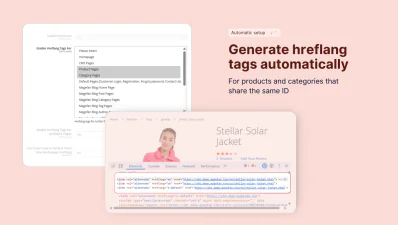
Generate Hreflang Tags for Magento Automatically
Magefan Hreflang Language Extension generates hreflang tags for products, categories and the homepage automatically once you enable it. The module matches pages across all store views without any editing or linking on your part.
If you have separate websites or catalogues that use different IDs per store view, you can still add or adjust hreflang language tags directly in the admin panel.
Improve your multi-language stores using hreflnag tags regardless of your setup.

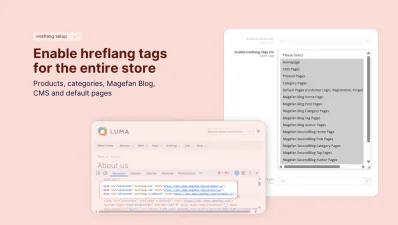
Add Hreflang Tags to All Pages via Admin
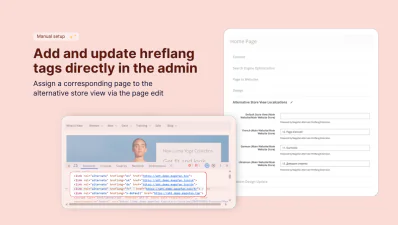
Add hreflang tags for the rest of the pages — CMS, contact, customer account, and other core pages — manually, directly from the admin.
Just open the page editing screen and fill out hreflang tags for a corresponding page for another store view. Magento 2 Hreflang Tags Extension assigns the hreflang language for both sides automatically, keeping every language linked from a single edit.
Running a ? Enable hreflang tags for blog posts and categories manually too.
Include Hreflang Language Tags in XML Sitemap
Help search engines discover localised pages without any extra crawling, using Magento Alternate Hreflang Extension.
Enable one option to include all hreflang links in your XML sitemap.
Make sure Google discovers alternative localised pages and countries you target faster.
Automate Hreflang Tags Across All Magento Pages
If you want to scale faster and spend less time managing hreflang tags in Magento, use Magefan .
It offers a handy store switcher for every page on your store, which allows content pages to share the same IDs.
Magefan Translator automate hreflang tags across all Magento pages while translating those pages automatically.
Improve International SEO with Magento 2 Hreflang Tags Extension
Magefan’s Hreflang Tags Module for Magento gives you full control over hreflang languages, regions, self-referencing tags and locale groups. This allows you to set up hreflangs across multiple websites and improve international SEO exponentially.
Enable Country Codes in Hreflang Tags
Selling the same language to different regions ( US English, GB English, AU English)?
Enable country codes in hreflang tags to differentiate regions based on default Magento locale settings or set custom locale codes for each store view.
Help search engines serve a personalised version of the page to the right audience, based not only on language, but region too. And avoid duplicate content penalties for near-identical language store views.
Keep Separate Hreflang Language Tags Across Websites
Separate alternate hreflang language tags between websites in a multi-website setup.
Magento 2 Hreflang Tags Extension allows you to use different locale groups for different websites to keep unrelated content separate.
This tells Google not to treat unrelated website content as alternative versions of each other.
Use Self-Referencing Hreflang on all Pages
Define the fallback page if the visitor’s language or region doesn’t match any of the existing alternatives on your store.
The Hreflang Language Extension adds a self-referencing x-default tag automatically to every enabled page based on your settings.
Tell Google what version of the page to serve in search results by default.
Magento Hreflang Language Use Cases
Add hreflang attributes to Magento pages in different scenarios, regardless of your setup — one or multiple websites, one or multiple store views per site. Locale group settings allow you to decide whether to connect store views between websites or keep them separate.
One Website with Multiple Store Views.
Multiple Websites. One Store View Each.
Multiple Websites. Multiple Store Views.
Why Do You Need Magento 2 Hreflang Tags for SEO?
Hreflang tags in Magento 2 improve international SEO across all store views by telling search engines which version of the page to show to a visitor in search results based on their language or location. Without them, Google may treat near-identical regional pages as duplicate content or send visitors to the wrong language version, which causes them to bounce back.
FAQs
What is hreflang?

Does Magento offer hreflang tags by default?
What is the best Magento Hreflang Language Extension?
How to add hreflang tags for multiple websites in Magento?
How to add hreflang tags (or other meta tags) to pages in Magento?
How to add custom locale to hreflang tags in Magento?
How to add country codes to alternate hreflang tags in Magento?
Feature Highlights
Automatic hreflang tags
No-code hreflang tags assignment
Default x-default support
Region targeting
Locale groups
XML sitemap support
Show localized pages in search results and improve store stitching in your multi-language store with hreflang tags.
