Stand with Ukraine! How can you help?
Find out more

Magento 2 Translation Extension

Magento 2 Translation Extension is the all-inclusive Magento localisation tool that allows you to translate every element and page on your store into multiple languages directly from the admin panel.

It comes with the 3 powerful AI translation integrations, translation popups and forms, a missing translation scanner and glossaries to help you find, translate and edit any text on any store view.

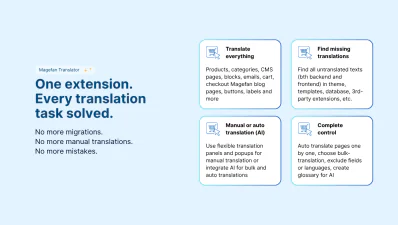
Translate any text on products, categories, pages, blocks, emails, blog, cart, and checkout manually, in bulk or automatically with the Magefan Language Translator for Magento.

Pricing plans:
Compare Plans and Pricing
$299
one-time-payment-info
one-time payment
Add to Cart
200+ languages supported | Translation forms and auto translations | AI translation tools
Not
a subscription
30 days
money back
365 days
of free support and updates
one-time-payment-info
Lifetime
access to source code
Magento translation extension
magento language translator
translate magento
magento atuo translate
Live DemoLive Demo
Compatibility:Magento 2.3.0 - 2.4.9 (CE, EE, ECE, B2B)
Version:2.6.2
Downloads
258,738 downloads
Github
GitHub Repository
Composer
Composer Package
Mage-OS
Mage-OS Compatible
Hyva
Hyvä Compatible
Breeze
Breeze Compatible
Made in Ukraine
Made in Ukraine

Why Do You Need Magento 2 Translation Extension?

Magefan Translation Extension is a robust translation tool that offers something for everybody — from more flexible manual translations to automatic AI translation

relevant

Flexible manual translation (Basic & Plus plans)

  • - Add translations from the admin panel or overwrite existing text
  • - Translate buttons, labels, and any other basic system messages
  • - Translate products and categories via a pop-up or a separate form
  • - Find all untranslated texts across your entire website
  • - Keep CMS blocks and pages ID the same for all store views
  • - Knockout template and JavaScript are translated automatically
  • - Import and export translations
relevant

Automatic Magento AI Translation Suite (Extra plan)

  • - Integrate AI translation tools (Google Translate, ChatGPT, DeepL)
  • - Use the “Auto Translate” button for all pages in your store
  • - Translate selected pages in bulk via “Auto Translate” mass action
  • - Schedule auto translations for all or selected pages
  • - Create a translation glossary for the AI translation tools
  • - Exclude languages or specific fields from auto translation
  • - Auto-trigger translation updates on any changes to the default locale

Features of the Magento 2 Translation Extension

Our Magento 2 Translation Module offers you controlled bulk translations and fully automated hands-free translation for Magento catalogue pages, blog, checkout and any third-party extension texts

Translate Magento Fast — Directly From Admin

Stop hustling between Magento translation services, manual translations and on-the-fly translation tools. They are hard to set up, control and maintain.

Magento Language Translator from Magefan offers you all-inclusive translations into 200+ languages.

Localise your entire store directly from the admin. No code editing. No headaches.

Add translations manually, or integrate AI translation tools for bulk auto translations. You have full control.

magento translate meta data
magento translation

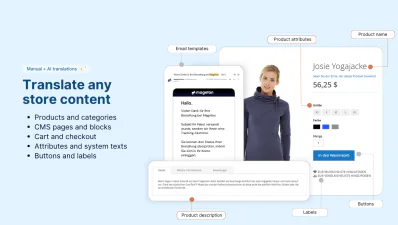
Localise Entire Store — From Labels to Products and Checkout

Magefan Translator offers you all-inclusive translations for every element on your store.

Translate, edit, update and easily maintain translations across all store views — from products and categories to customer area, cart, checkout and blog.

Make sure every title, description, attribute, URL, button, label, option, popup, banner or message is localised for each store view through translation forms or auto translation.

Auto Translate Magento with AI Tools

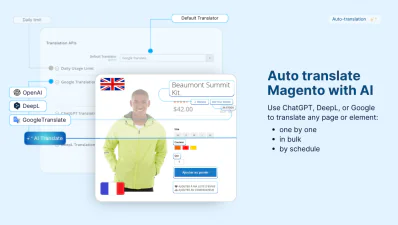
Magento 2 Translation Extension offers seamless integration with three powerful AI engines — Google Translate, ChatGPT, or DeepL so you can:

  • - Auto translate specific pages: through a direct translation option on each page
  • - Bulk translate multiple pages: via every grid mass actions
  • - Schedule auto translation: for all or specific page types that will translate and update translation on autopilot
  • - Create and manage a glossary: for all AI tools directly in the admin
magento translation connector
magento translation shedule

Auto-Trigger and Auto Sync Translations

Although Google Translate, DeepL or ChatGPT handle the translations, Magefan Translation Extension does all the heavy lifting. This tool:

  • - Auto-triggers translations for all existing and new pages and content fields
  • - Auto-triggers translation updates if the default locale is updated
  • - Auto-syncs translations with Magento and assigns them to the corresponding store views
  • - Keeps your styles and HTML formatting intact for all widgets, blocks, and custom HTML

Just schedule the auto-translation of all or some specific entities for hands-free Magento translation.

Bulk Translate Multiple Pages into Multiple Languages

Want a more controlled Magento localisation workflow with some automation? Use mass actions.

Select specific pages — products, categories, CMS pages, blocks, blog posts or categories — and send them for translation to all or specific languages (store views) in just one click.

Reduce manual work and save hours with the all-in-one Magento Translation Extension.

magento auto translation mass action
skip page fields from translation magento

Control What Languages and Fields to Translate

With the Magento 2 Translation Extension, you have full control over your translations. Choose what gets translated, how and when.

  • - Exclude specific fields from auto translations to protect sensitive content and preserve custom formatting.
  • - Exclude store views from auto translation to scale translation gradually (add and translate to new languages any time).

Find and Add Missing Translations

Scan your store automatically to find untranslated text in templates, theme, database, extensions, and emails. It’s all there — in the “Search and Translate”.

Use extended filters to find translations missing in:

  • - Frontend
  • - Admin panel
  • - Emails
  • - Specific language
  • - Specific file
  • - Specific module

Quickly edit or add missing translations for all store views from one grid.

magento translations
translate magento

Add and Edit Product & Category Translations Faster

No need to switch store views multiple times to translate or edit one product or category. Use Magento Translation Extension popups and forms instead.

Choose between an inline pop-up for quick changes of specific fields or form views for detailed updates.

Auto translate, review and edit your catalogue pages faster with Magefan.

Apply Translations Throughout the Entire Store

Avoid translating the same phrases over and over again. Maintain consistency across the entire store, even if you have multiple store views.

Create and edit a reusable translation dictionary with common translations to speed up localisation.

Add a translation once. Magento Language Translator will make sure they are applied in all the right places.

translate buttons and labels
magento translation history

Track Translation History and Schedules

It’s easy to lose track of what was changed and when with the Magento auto-translation running in the background. So we made sure it never happens.

Stay in control with a detailed log of every translation task — bulk translation or scheduled auto translation.

Monitor and adjust your strategy to improve automation over time.

Import and Export Translations Easily

Done Magento translation before on planning to migrate to a different instance? No problem.

Use simple import and export tools to migrate translations across stores, environments or languages.

Handle thousands of translations without manual editing.

magento translation import export

How Does Magento Auto Translate Work?

Magento auto translation works based on the AI translation tools that enable you to translate any page or content via the “Auto Translate” button, mass translation action or translation schedule.

relevant

Integrate AI translator for Magento

We offer seamless integration with Google Translate, DeepL or ChatGPT through API. Just set up an API and paste it into your admin panel to enable auto translation for Magento.
relevant

Choose the auto translation method

Choose a more controlled translation with the manual “Auto Translate” option on each page, specific page section or mass actions. Or set up an auto translation schedule for hands-free translation for all pages.
relevant

Schedule auto translations and updates

Enable translation schedule for all or specific pages to send them for translation on autopilot. The Magefan Translation Extension auto-triggers translations and updates for translated texts.
relevant

Monitor and edit translation if necessary

Monitor all translated or scheduled for translation pages in the “Translation Schedule” panel. Go to any page and edit the translations for all store views at once in the translation forms or popups.

Frequently asked questions about the Magento 2 Translation

Can I auto translate only products in Magento?

collapsible icon
Yes. You can schedule auto translation for products only by choosing Products as the Source in the Auto Translations section. If you use a bulk translation in Magento, simply use the “Auto Translate” mass action on the products grid.

Does the Translation extension detect missing translations automatically?

collapsible icon
Yes. You can find all untranslated texts or missing translations in the “Search and Translate” button using multiple filters. You can translate texts missing on different store views directly from this panel.

Does Magento 2 Translation module cover CMS pages, categories, and checkout content?

collapsible icon
Yes. Magefan Translation Extension for Magento can translate various types of content, including CMS pages, categories, checkout options and forms. In fact, this tool allows you to translate any element and page on your store frontend and admin panel.

Do I need to pay for Google Translate, DeepL, or ChatGPT API separately?

collapsible icon
Yes. The Magento 2 Translation Extension integrates with these services, but the API usage is billed separately. However, translation services like Google Translate API and DeepL offer free monthly translation tokens, while ChatGPT is a completely paid solution.

Will translated content be indexed by Google as separate language pages?

collapsible icon
Yes. Magefan Language Translator assigns translations to dedicated fields and stores views. So these translations appear on frontend and get indexed by Google as a separate language versions. This improves international SEO and allows you to rank for multiple languages.

Can I translate Magento SEO data like meta titles, descriptions, and URLs?

collapsible icon
Yes. Our Magento 2 translation extension can translate SEO elements such as meta titles, meta descriptions, and URL keys if you don’t exclude these fields from auto translation. Make sure you configure the excluded fields for all pages to avoid SEO issues before running the translation.

How do I translate only one language without running translations for all store views?

collapsible icon
You can translate pages only for one language using the “Auto Translate” in the mass actions dropdown. No existing translations of other views will be affected in this case. This works for your current set-up as well as for the languages you add in the future.

Why is Magefan Translation Extension best for Magento?

collapsible icon
Magefan Translation Extension is the best language extension translator for Magento since it offers merchants a flexible translation workflow directly from the admin panel. It comes with manual translation tools for simple text editing and translation, finds missing translations on all store views and adds translations with no code editing for simpler translation needs. For more advanced setups with more languages, there is the AI translation integration that automates the translation of any page, elements or text on Magento stores.

How to install Magento 2 Translation Extension?

collapsible icon
You can install the Translation Extension using the composer installation instructions in your Magefan account under the "My Downloads" section.

Alternatively, you can upload an extension archive to your Magento folder and run the composer update commands:

php bin/magento setup:upgrade
php bin/magento setup:di:compile
php bin/magento setup:static-content:deploy

People Also Searched For
magento translation
magento 2 translation extension
magento translation connector
magento 2 google translate extension
magento 2 translations
magento translation extension
magento 2 translate module
magento 2 language translation
magento 2 translation
magento translations
magento website translation
Feature Highlights
Basic translations
Basic translations Translate labels, buttons, system messages, and interface texts from the admin
CMS pages and blocks switcher Plus
Translate static content within the same entity
Google Translate Extra
Automatically translate store content using Google Translate API
Bulk translation Extra
Translate multiple pages or fields to all or specific languages
DeepL Translator Extra
Get more accurate translations with advanced DeepL integration
Find missing translations Plus
Scan your website for untranslated texts in any language, module or file
Translation form and popup Plus
Translate products and categories for all store views in a pop-up or form
Import and export
Upload or download basic translations in bulk
ChatGPT TranslationExtra
Generate natural, context-aware translations using ChatGPT
AI translation glossary Extra
Create glossary for specific terms to translate them consistent across all languages
Translation sync Extra
Keep translations updated automatically when original content changes
Translation schedule Extra
Send all or specific pages or translation automatically (by cron)
Quick Overview Video

As a great alternative to Magento 2 Translate Inline Tool, our Magento 2 Translation extension allows you to add translations directly in the admin. All you need to do is to add the translation and choose the locale to add it for.


Can it be that easy? It surely can.

Check out this short video to see how easy it is to translate Magento with our module!
Related Products
Magento 2 GeoIP Switcher
Store Switcher
Regular Price $178 Special Price $149
(37)
Direct customers to store views in their local language and currency. Deliver a better shopping experience while selling worldwide.
Magento 2 SEO Extension
SEO
$99
(63)
Improve your search positions, drive more organic traffic and increase conversions. Automate your store SEO with Magefan.
Magento 2 Hreflang
Hreflang Tags
$99
(14)
Make sure Google "sees" your localised pages and displays a corresponding version in search. Drive more traffic to your store and improve the store switcher.
 

Reviews about Magento 2 Translation Extension

Magento 2 Translation Extension
Live Demo
chevron-up Top