
Magento 2 Translation Extension | 4 AI Translation Engines
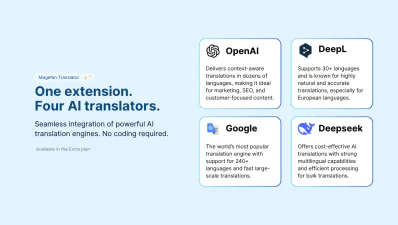
Magefan Magento 2 Translation Extension is a 100% open code language translation tool downloaded over 278 000 times and trusted by thousands of merchants worldwide to translate every element on Magento 2 stores — from buttons and labels to products, categories, blog, emails and checkout — directly from the admin panel. It's the only Magento 2 extension that supports 4 leading AI translation engines — DeepL, ChatGPT, Google Translate and Deepseek — in one single module
It supports over 200+ languages and comes with manual translation popups & forms, missing translation scanner and glossaries to help you find, translate and edit any text on any store view. Translate content manually or in bulk, for one or all store views at once, for one page field or the entire page — Magefan Translation Extension for Magento offers you complete control.
- - Compatible with Hyva Theme
- - Compatible with Hyva Checkout
- - Compatible with Breeze Theme
- - Compatible with Magento Open Source and Adobe Commerce (including Cloud Edition)


 Live Demo





Why Do You Need Magento 2 Translation Extension?
Magefan Translation Extension is the only Magento module that combines manual translation tools, AI-powered auto translation via Google Translate, ChatGPT, DeepL, and DeepSeek and an automatic missing translation scanner — all in one extension.
It is built for Magento 2 merchants, developers, and agencies who need to go beyond default CSV translations and want a complete, maintainable localisation workflow for catalogues of any size.

Flexible manual translation (Basic & Plus plans)
- - Add translations from the admin panel or overwrite existing text
- - Translate buttons, labels, and any other basic system messages
- - Translate products and categories via a pop-up or a separate form
- - Find all untranslated texts across your entire website
- - Keep CMS blocks and pages ID the same for all store views
- - Knockout template and JavaScript are translated automatically
- - Import and export translations
Automatic Magento AI Translation Suite (Extra plan)
- - Integrate AI translation tools (Google Translate, ChatGPT, DeepL, Deepseek)
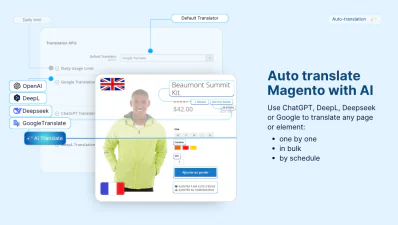
- - Use the “Auto Translate” button for all pages in your store
- - Translate selected pages in bulk via “Auto Translate” mass action
- - Schedule auto translations for all or selected pages
- - Create a translation glossary for the AI translation tools
- - Exclude languages or specific fields from auto translation
- - Auto-trigger translation updates on any changes to the default locale
Features of the Magefan Translation Extension for Magento
Magefan Translation for Magento offers you controlled bulk translations and fully automated hands-free translation for small to large catalogue pages, blog, checkout and any third-party extension texts.
Translate Magento Fast — Directly From Admin
Managing Magento localisation across multiple tools — CSV files, translate inline editors, translation agencies, and separate AI services — creates a workflow that is hard to maintain.
Magefan Translation Extension centralises the entire process directly inside the Magento admin.
Translate your store into 200+ languages manually, or connect ChatGPT, DeepL, DeepSeek, or Google Translate for bulk and scheduled auto translation.
All translations are stored in the Magento database and assigned to the correct store views automatically. No code editing. No CSV files.
Localise Entire Store — From Labels to Products and Checkout
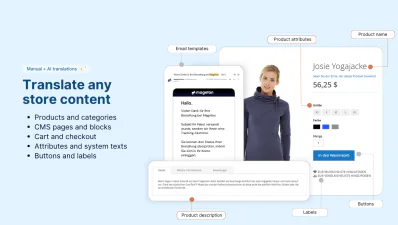
Magefan Translator offers you all-inclusive translations for every element on your store.
Translate, edit, update and easily maintain translations across all store views — from products and categories to customer area, cart, checkout and blog.
Make sure every title, description, attribute, URL, button, label, option, popup, banner or message is localised for each store view through translation forms or auto translation.
Auto Translate Magento with AI Tools
Magento 2 Translation Extension offers seamless integration with three powerful AI engines — Google Translate, ChatGPT, DeepL or DeepSeek so you can:
- - Auto translate specific pages: through a direct translation option on each page
- - Bulk translate multiple pages: via every grid mass actions
- - Schedule auto translation: for all or specific page types that will translate and update translation on autopilot
- - Create and manage a glossary: for all AI tools directly in the admin
Auto-Trigger and Auto Sync Translations
Once Google Translate, DeepL, ChatGPT or DeepSeek integrations are configured, Magefan Translation Extension runs the entire translation process without any manual input. It:
- - Auto-triggers translations for all existing and new pages and content fields
- - Auto-triggers translation updates if the default locale is updated
- - Auto-syncs translations with Magento and assigns them to the corresponding store views
- - Keeps your styles and HTML formatting intact for all widgets, blocks, and custom HTML
Just schedule the auto-translation of all or some specific entities for hands-free Magento translation.
Bulk Translate Multiple Pages into Multiple Languages
Want a more controlled Magento localisation workflow with some automation? Use mass actions.
Select specific pages — products, categories, CMS pages, blocks, blog posts or categories — and send them for translation to all or specific languages (store views) in just one click.
Reduce manual work and save hours with the all-in-one Magento Translation Extension.
Control What Languages and Fields to Translate
With the Magento 2 Translation Extension, you have full control over your translations. Choose what gets translated, how and when.
- - Exclude specific fields from auto translations to protect sensitive content and preserve custom formatting.
- - Exclude store views from auto translation to scale translation gradually (add and translate to new languages any time).
Find and Add Missing Translations
Scan your store automatically to find untranslated text in templates, theme, database, extensions, and emails. It’s all there — in the “Search and Translate”.
Use extended filters to find translations missing in:
- - Frontend
- - Admin panel
- - Emails
- - Specific language
- - Specific file
- - Specific module
Quickly edit or add missing translations for all store views from one grid.
Add and Edit Product & Category Translations Faster
No need to switch store views multiple times to translate or edit one product or category. Use Magento Translation Extension popups and forms instead.
Choose between an inline pop-up for quick changes of specific fields or form views for detailed updates.
Auto translate, review and edit your catalogue pages faster with Magefan.
Apply Translations Throughout the Entire Store
Avoid translating the same phrases over and over again. Maintain consistency across the entire store, even if you have multiple store views.
Create and edit a reusable translation dictionary with common translations to speed up localisation.
Add a translation once. Magento Language Translator will make sure they are applied in all the right places.
Track Translation History and Schedules
It’s easy to lose track of what was changed and when with the Magento auto-translation running in the background. So we made sure it never happens.
Stay in control with a detailed log of every translation task — bulk translation or scheduled auto translation.
Monitor and adjust your strategy to improve automation over time.
Import and Export Translations Easily
Done Magento translation before on planning to migrate to a different instance? No problem.
Use simple import and export tools to migrate translations across stores, environments or languages.
Handle thousands of translations without manual editing.
How Does Magento Auto Translate Work?
Magento auto translation works based on the AI translation tools that enable you to translate any page or content via the “Auto Translate” button, mass translation action or translation schedule.
Integrate AI translator for Magento
Choose the auto translation method
Schedule auto translations and updates
Monitor and edit translation if necessary
Frequently asked questions about the Magento 2 Translation

The Plus plan ($199) adds the missing translation scanner, translation forms and popups for products and categories, and CMS block/page switcher for easier translation within the same entity.
The Extra plan ($299) includes everything in the previous two plans, plus all four AI translation integrations (Google Translate, DeepL, ChatGPT and DeepSeek) which enable bulk translation via mass actions, scheduled auto translation, the AI translation glossary, and automatic translation updates when source content changes.
As a great alternative to Magento 2 Translate Inline Tool, our Magento 2 Translation extension allows you to add translations directly in the admin. All you need to do is to add the translation and choose the locale to add it for.
Can it be that easy? It surely can.
