

 Live Demo
Magento 2 Google Shopping Feed | Google Merchant Feed
Magefan Magento Google Shopping Feed is a Magento 2 extension that automatically generates a product feed for Google Merchant Center in machine-readable XML format, updates it daily by cron generation, and gives you full control over what attributes, products and categories to include in the feed. The extension comes with a pre-built Google product feed template, allows you to map Magento product attributes to Google required fields, and supports all product types, including configurable, bundle and grouped products.
Generate Magento Google Product Feed automatically for multi-language and multi-currency stores, and show your products in Google Shopping, Google Ads, Google Assistant, Google Search.







Boost Sales with a Dedicated Magento 2 Google Shopping Feed
Magefan Google Shopping Feed for Magento automatically generates a valid, error-free product feed for Google Merchant Center and keeps it updated to make sure only valid items are displayed in free Google Shopping listings, Google Ads, Google Images, Google Assistant and other Google channels.

Create a Magento Feed for Google Shopping Automatically
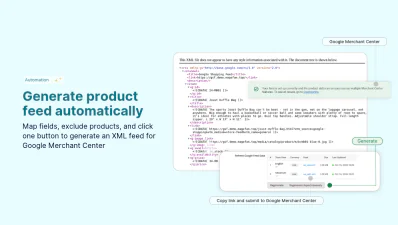
Generate a Google Shopping Feed for Magento automatically from your existing catalog, without any custom tools and exports.
The Magento Google Product Feed extension creates a product feed in the correct XML format with all required and custom product attributes.
It keeps the Google feed updated in Merchant Center to always reflect the current state of your catalog without any extra manual updates or settings.
Map Product Attributes or Use a Pre-Built Template
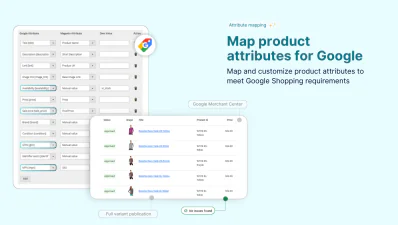
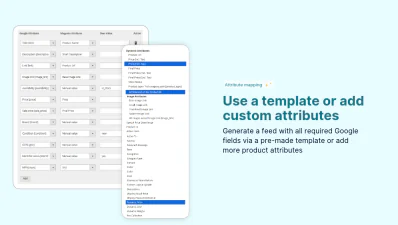
Create product feed that meets Google Merchant Center requirements and includes all required attributes: title, description, GTIN, MPN, availability, price, brand and others. Magento 2 Google Shopping Feed Extension comes with a pre-built template so you don’t have to build a new feed from scratch.
- - Use the pre-built attribute template — review a ready-made attribute mapping template, adjust and generate a feed with all required Google feed fields immediately.
- - Map existing product attributes — edit current product attribute mapping with custom attributes or custom values to generate rich Google Shopping feeds.
- - Change attribute mappings any time — review, configure, and update all attribute mappings any time and simply regenerate the feed to reflect updated data.
Include Any Product in the Feed
Magento 2 Google Shopping Feed supports all Magento product types to make your entire catalogue eligible for Google Shopping and Google Ads campaigns.
Submit individual products with all required Google Shopping attributes mapped directly in Magento admin.
Include parent product with all child variants for configurable, grouped or bundle products. Help shoppers see exact size, colour and configurations they are searching for.
Match Magento Categories to Google Taxonomy
Match Magento product categories to Google taxonomy to ensure every product in the feed is assigned to the correct Google Shopping category.
Navigate to every category or product and assign categories to Google product taxonomy, or simply inherit the settings from the parent categories.
Reduce the risk of feed disapprovals and improve product visibility with built-in taxonomy classification in the Magento 2 Google Product Feed Extension.
Create Magento Google Feeds for Every Language and Currency
Make sure you submit the right prices to Google Merchant Center. Target relevant audiences and run Google campaigns for different countries effortlessly.
Magefan Google Shooping Feed helps you to generate a feed with default or all available currencies per store view.
This allows you to generate separate feeds for each store view with a corresponding language, currency and product data to sell across multiple markets.
Get Full Control Over Magento 2 Google Product Feed
Except for generating product feeds, Magefan Google Shopping Feed Extension provides tools to control what products to include in the feed, verify products in the feed and exclude specific items from the feed XML.
Update and Sync the Product Feed in Google Merchant Center
Keep Google product feed up to date even when prices change, new products are added to your store, or items get out of stock.
Magento 2 Google Shopping Feed updates the product feed automatically by cron every day to always reflect your currency catalog and availability.
Once you submit the product feed link to Google Merchant Center it will pull the updated product data on your preferred schedule to avoid data mismatch or product disapproval.
Exclude Products and Categories from the Feed
Make sure only relevant items are added to your Google Shopping Feed for Magento to optimise campaigns and avoid issues.
- - Exclude specific products — exclude products from feed XML at the product page level for one-off exceptions.
- - Exclude specific categories — exclude entire categories (with products) from the feed on a category level, without removing individual products.
- - Exclude out-of-stock products — automatically remove out-of-stock products from the feed to avoid Merchant Center warnings and wasted clicks.
- - Exclude free products — filter out free items that are ineligible for standard Google Shopping campaigns.
Verify Products in the Feed via Preview
Confirm that specific products are included in the Google Product Feed, and view included data before submitting it to Google Merchant Center.
See exactly why any product is excluded: out-of-stock status, price lower than 0, active exclusion rule or any other issue.
Verify products, view product via preview and fix issues before they become Merchant Center disapprovals.
Track Every Sale from the Google Product Feed
Measure performance, track conversions, revenue and engagement from product feed directly in Google Analytics.
Magento 2 Google Shopping Feed Generator allows you to set up Google Analytics tracking to attribute sales back to your feed.
Optimize your spend, track which sales come from Google Shopping, and measure your campaigns alongside other traffic data.
Where Can I Use Magento Google Product Feed Except Google?
Google Feed XML format has become a standard for several advertising platforms, which means the feed generated by the Magento Google Shopping Feed Generator works beyond Google Merchant Center: on Meta, Pinterest, TikTok and Microsoft platforms.
Facebook and Instagram
Pinterest Product Feed
TikTok Shop and TikTok Ads
Microsoft Ads (Bing Shopping)
Magento 2 Google Shopping Feed Extension helps merchants integrate and manage their Magento products across multiple channels: Google Shopping, Google Ads, Google Search, Google Images, as well as Facebook, TikTok, Pinterest and Microsoft platforms. It facilitates product uploads and updates across all these channels and keeps all multi-language and multi-currency feeds optimised with relevant product, prices, availability and other critical data to ensure compatibility and compliance with each platform's requirements.
Frequently asked questions about the Magento Google Shopping Feed
What is Magento product feed?

Does it support configurable, bundle or grouped products?
How do I create separate Google Shopping feeds for different languages in Magento?
Why are some products missing from my Magento Google Shopping feed?
Does Magento Google Product Feed override products added to Merchant Center manually?
How to add custom product attributes to the Magento product feed?
How to generate Magento product feed with different currencies?
What product data is required for Google Shopping feeds?
How to show prices including or exluding tax in product feeds in Magento?
Key Features
Fast Google Shopping feeds setup
Product attribute mapping
Automatic feed updates
Product filtering
Category mapping
All product types support
Multi-language feeds
Multi-store feed management
Product preview
Don't spend time, effort and money on product feed solutions you don't need. Create Google Shopping Feed in seconds with a straightforward and effective Magefan Feed Generator.
