Magento 2 OpenAI Ads Conversion Tracking | ChatGPT Ads Conversions

Magefan Magento 2 OpenAI Ads Conversion Tracking is an extension that connects Magento with an OpenAI Ads Manager account via the OpenAI Ads Pixel or Conversion API (CAPI) directly via the admin. It tracks page and product views, add to cart, initiate checkout, purchase, registration and lead creation events via client- or server-side tracking, while complying with all major data privacy regulations.

Track the entire customer journey after clicking ChatGPT ads, from page views to purchases, to see how each campaign, product or audience performs. Use OpenAI Ads Conversion Tracking for Magento to measure ad performance and optimise ad spend.

$149
one-time-payment-info
one-time payment
Coming soon
7 key eCommerce events, 2 tracking methods (client-side and server-side), 100% accurate tracking
Not
a subscription
60 days
money back
365 days
of free support and updates
one-time-payment-info
Lifetime
access to source code
magento openai ads conversion tracking
connectt openai ads pixel to magento
openai ads conversion events
mageno openai ads conversion api
Compatibility:Magento 2.3.0 - 2.4.9 (CE, EE, ECE, B2B)
Version:2.0.0

Optimise ChatGPT Ads with Magento OpenAI Ads Conversion Tracking

Magento 2 OpenAI Ads Conversion Tracking Extension connects Magento stores with OpenAI Ads Manager and allows you to measure the performance of ChatGPT Ads more accurately. It helps you to track all vital eCommerce events - from first click to purchase and leads and feeds that data back to OpenAI Ads Manager to optimise your ad campaigns.

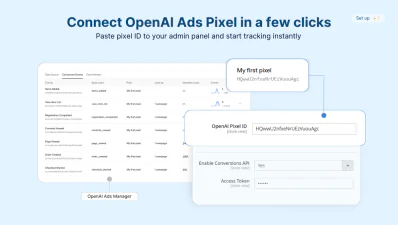
Connect OpenAI Ads Pixel to Magento in a Few Clicks

Add OpenAI JavaScript Pixel to Magento without a single line of code and start tracking conversion data immediately.

Magento 2 OpenAI Ads Extension injects a tracking script across all pages after you paste it in the admin panel.

Connect your store with OpenAI Ads Manager via a pixel ID in a few clicks.

add openai ads pixel to magento
openai ads covnersion tracking events

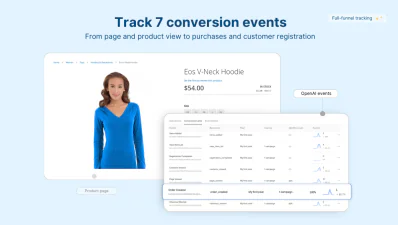
Track Entire Customer Journey after ChatGPT Ads

Magefan OpenAI Ads Conversion Tracking tool maps key eCommerce events with matching OpenAI Ads event, you can track the entire customer journey after clicking your ad in ChatGPT:

  • - View Page - track every page visit from ChatGPT ads.
  • - View Product - track product page views.
  • - Add To Cart - track when shoppers add products to cart.
  • - Begin Checkout - track how visitors start the checkout process or when they drop off.
  • - Order Placed - track completed orders and revenue.
  • - Registration Completed - track new account creation.
  • - Lead Created - track form submissions by leads.

Map Product Identifier with ChatGPT Ads Requirements

Avoid catalogue mismatches or rejected events to keep product tracking consistent across your entire catalogue.

Make sure your product attributes match the identifier required by OpenAI Ads.

Map product ID, SKU or any other custom attribute with OpenAI Ads Extension for Magento, so that every product event sends accurate structured data back to the Ads Manager.

openai product ads matching for magento

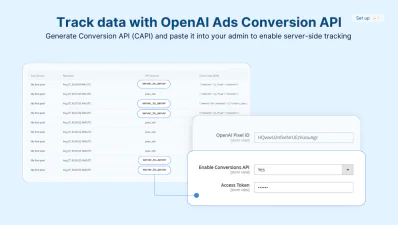
Enable Server-Side Tracking with OpenAI CAPI in Magento

Track accurate data even when client-side tracking fails. Magento 2 OpenAI Ads Conversion Tracking adds server-side tracking through OpenAI Conversions API (CAPI).

Set up Server-Side Tracking for OpenAI Ads

Configure OpenAI Ads Conversion API directly in Magento admin and never miss conversion data due to ad blockers or cookie restrictions.

OpenAI Ads Conversion API sends conversion events from the Magento server to the OpenAI Ads server.

Track key actions customers perform on your store without the limitations of an unreliable browser pixel.

magento 2 openai ads conversion api
defer openai ads script loading magento

Defer OpenAI Pixel Script Loading

Magefan OpenAI Ads Integration allows you to track data accurately without slowing down your site.

Enable deferred loading for the OpenAI Ads Conversion Pixel, so it loads only after the user's interaction — clicks, scroll, or touch.

Keep your store fast for every visitor while capturing data for ChatGPT Ads reliably.

OpenAI Ads Tracking that Complies with GDPR/CCPA/LGPD

Magento 2 OpenAI Ads Conversion Tracking can fire OpenAI scripts before or after customer consent.

Enable customer data protection when sending data to OpenAI only after customers give consent.

Track ChatGPT Ads conversions while staying compliant with all major data privacy regulations like GDPR, CCPA and LGPD.

gdpr compliant openai adts tracking in magento

How Does OpenAI Conversion Tracking Work in Magento?

All you need to set up ChatGPT Ads conversion tracking for Magento is to add the OpenAI Ads Conversion Pixel and Conversion APIs to the admin.

relevant

Step 1: Connect OpenAI Ads with Magento

Find OpenAI Pixel ID and Conversion API credentials in your OpenAI Ads Manager and paste them into your Magento admin.
relevant

Step 2: Run your ChatGPT Ads

Once you run your ads, customers interact with your store (view pages, products, add products to cart, place orders, submit forms).
relevant

Step 3: Capture data with OpenAI Ads Pixel or CAPI

The extension captures event data with all required page and product details via a pixel or server-side Conversion API, or both and sends them to OpenAI Ads Manager.
relevant

Step 4: View data in OpenAI Ads Manager dashboard

Review all captured conversion data, analyse ad performance and use that data to optimise specific campaigns and ad spend.

FAQ

What is OpenAI Ads Conversion Tracking?

collapsible icon
OpenAI Ads Conversion Tracking is a native feature OpenAI presented in May 2026 that helps measure actions users perform on a website after clicking through the ChatGPT Ads, such as product and page views, add-to-cart actions, starting checkout, purchasing orders, submitting forms and creating an account. OpenAI provides two ways to send data back to their Ads Manager: the Conversion Pixel and the Conversion API for server-side tracking.

How do I add the OpenAI Ads Pixel to Magento?

collapsible icon
To add the OpenAI Ads Pixel to Magento, use Magefan’s Magento OpenAI Ads Conversion Tracking Extension. It allows you to paste the Conversion Pixel and Conversion API directly into the Magento admin panel with no code editing or developer support.

Do I need both the pixel and the Conversion API?

collapsible icon
Using both the OpenAI Ads Conversion pixel and API is recommended since the pixel captures only browser-side (client-side) behaviour while CAPI captures customers' actions server-side. Running both in Magento ensures the best data accuracy in case ad blockers or cookie restrictions are used. Magefan OpenAI Ads Extension comes with built-in event deduplication, so no event duplicates show in reports.

Can I track ChatGPT ads across multiple Magento store views?

collapsible icon
With Magento ChatGPT Ads Conversion Tracker, you can create multiple OpenAI Pixel IDs and APIs and assign them to different store views and track conversions separately for each market or language you serve.

Is OpenAI Ads tracking in Magento GDPR compliant?

collapsible icon
The OpenAI Ads Extension for Magento respects users' consent choices, and it doesn’t send any events to OpenAI Ads Manager until user consent, which makes it GDPR, CCPA, and LGPD compliant. Additionally, you can set the Conversion pixel to load before or after consent to improve performance.

What events can I track for OpenAI Ads in Magento?

collapsible icon
Magento OpenAI Ads Conversion Tracker allows you to track Page View (page views), Contents Viewed (product views) View Item List (category page or related product block views), Items Added (add to cart), Checkout Started (begin checkout), Order Created (purchase), Registration Completed (account sign-up), and Lead Created (form submissions) with additional events available for creation in the OpenAI Ads Manager account for server side tracking (CAPI).

Key Features of the Magefan OpenAI Ads Conversion Tracker

Easy OpenAI Ads Pixel integration

Connect OpenAI Ads Pixel to Magento without manual script installation

Advanced conversion tracking

Track conversion events like contents_viewed, items_added, checkout_started, order_created, registration_completed

OpenAI Ads Conversion API support

Set up server-side tracking for OpenAI Ads through Conversion API and send data directly to the OpenAI server

View item list limits

Set a limit for the maximum number of items in the list to include in the contents_viewed even

Advanced product matching

Map Magento product attributes with the required OpenAI Ads product identifier for better attribution

Multiple pixels support

Create and manage multiple OpenAI Pixel IDs and Conversion APIs to track data for every store view

GDPR-friendly tracking

Send conversion tracking data to OpenAI Ads manager based on customer consent

Deferred script loading

Load OpenAI Ads pixel tracking script only after user interaction to optimise performance

Lead and registration tracking

Capture lead_created and registration_completed events to measure full-funnel performance, not just purchases
chevron-up Top
   Free Magento extension installation this August. Browse extensions!