

Magento 2 Security Extension | Magento Security Scanner
Magento 2 Security Extension is an advanced security scan for Magento that regularly detects potential security vulnerabilities in the admin panel and database, gathers them in one security checklist and sends notifications about every security risk. It detects file changes, malware, malicious and exposed files, insecure file and account permissions, weak admin security settings, outdated Magento versions, and blocks spam and bot registrations in Magento.
Magento security checker keeps track of every admin action - all failed and unauthorised login attempts, admin panel changes, and pages admins view, create or detele.
Magefan offers you a security suite that protects you from cyber attacks, break-in attempts, and any Magento security breaches in both the admin and database.


 Live Demo





Why Do You Need Magento 2 Security Extension?
Magento stores are often targeted by bots, spam, malware, admin takeovers and other security breaches. Magefan’s Magento Security Suite helps you detect security vulnerabilities, track suspicious activity, get notified of malicious actions on your server, and prevent issues before they become problems.

Protect the Magento database from malicious actions
Your database is the main target for attackers who constantly try to get hold of your customer and order data or admin credentials. The security scan detects malware, unauthorised files or insecure permissions before they are exploited by attackers.
Monitor, prevent and fix any admin vulnerabilities
An unprotected admin panel is the easiest way for attackers to get into your store. Magento Security Extension logs every admin action in the admin, flags weak login settings, monitors unauthorised login attempts and tells you exactly what to fix.
Monitor and Block Unauthorised Admin Activity
Know exactly who logs into your admin panel and what they change there. These features come from the Magento Admin Action Log that is part of the Magefan Security Extension.
Track Admin User Actions
Monitor and keep track of every change made in your admin panel, so you can always find who did what and when.
See what every admin user viewed, edited, created, and deleted in products, customers, CMS content or configuration sections.
Filter the log by admin user, date or entities to quickly trace back any change to its source and fix it.
Track Admin Login Activity
Magento 2 Security Extension helps you stop suspicious behaviour before it becomes a security breach by monitoring every login to your admin panel.
Track successful and failed logins - review who accessed your admin panel and from which countries and IPs.
Monitor unusual login patterns - detect brute–force attacks by repeated failed login attempts.
Detect account sharing - notice when several people use the same account from different locations.
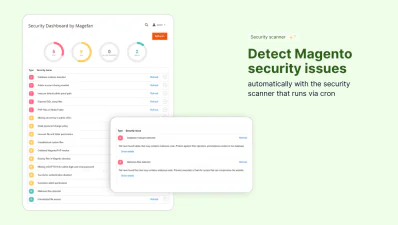
Detect and Prevent Potential Issues with Magento Security Scanner
Magefan’s Magento Security Scan checks your store for known security weaknesses, notifies you about them and tells you how to fix them. Run the security scan in Magento admin directly without any external tools or manual file checks.
Track File Changes in Magento
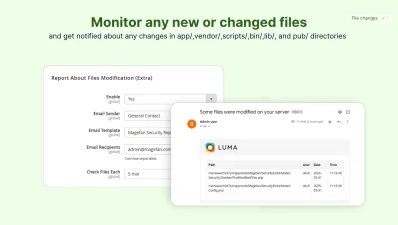
Get notified about any file changes in your Magento store to spot potential malware before it causes data leaks.
Magento Security Extension detects modified, added or removed files in your Magento directory regularly and sends you alerts.
See what files were affected, who made the change, when and at what time to trace back the source.
Prevent Customer Registration Spam in Magento
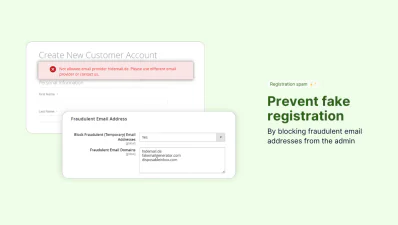
Prevent bots from abusing promotions, testing stolen cards, and filling your customer database with fake accounts.
Use Magefan Security Module for Magento to block fraud and temporary email addresses, so only real users can register at your store.
Notify users about the blocked email provider to block them before they cause problems.
Protect Magento Database
Magento Security Checker scans your database for the most common file risks, such as malware, insecure file permissions, or unauthorised files.
- - Detect malware and malicious files in the database: find infected files that can steal data or inject code.
- - Detect insecure file and folder permissions: spot permissions that give attackers more access.
- - Find unauthorised custom files in the database: find files that don’t belong to your Magento or any third-party extensions you use.
Check the System for Malicious Files
Protect your store from automated scanners that can download your config or database backups directly from the web.
Detect unrestricted access to sensitive files and enforce stricter rules to prevent private config and system files from being accessed from the web.
The Magento 2 Security Extension also scans your database for exposed SQL dump files and detects sensitive backup files in the Magento directory which could leak sensitive data.
Download Magento Security Patches Regularly
Magento Security checker tells you exactly when it’s time to update Magento or the PHP version.
Download Magento security patches, install them, and update to fix known security vulnerabilities in time.
Avoid any potential risks and always stay updated.
Protect Magento Admin Security
Secure your Magento admin by finding and eliminating any potential login, password and permission vulnerabilities:
- - Monitor admin account sharing and weak passwords: make sure each user has a separate account with a strong password.
- - Check for missing reCAPTCHA: detect admin login and reset password forms that need protection.
- - Check for excessive admin permissions: find and restrict users with more permissions than they need.
Detect Magento Security Vulnerabilities
Find critical gaps in Magento admin security faster with a dedicated Magento Security Extension.
Detect insecure admin paths or missing secret keys and get notified when two-factor authentication is disabled.
Make sure bots can’t find and attack your login page and somehow guess their way into your admin.
Frequently questions about the Magento 2 Security Extension
How does Magento security extension work?

It detects suspicious activity, tracks all admin changes, monitors login activity, blocks fraudulent emails from logging in and notifies you about any file changes. Instead of manual checks, you rely on the extension to continuously check your store in real time.
What security issues can Magento 2 Security Extension prevent?
Can Magento security plugin detect vulnerabilities automatically?
What is the best Security Extension for Magento?
What security features does Magento offer out of the box?
What security fixes are included in Magento 2 updates?
How do I check if my Magento 2 store has been hacked?
Which files does the Magento 2 Security Extension track?
How do I stop fake customer registrations in Magento 2?
How do I find exposed SQL dump and backup files in Magento 2?
Key Features
Security vulnerability scanner
Restrict fake registration
ExtraMalware detection
PlusAdmin activity log
PlusFile access checker
File editing alerts
ExtraLogin attempts checker
PlusAdmins accounts monitoring
Admin security tracker
- Samples
- Security v2.1.0
