

 Live Demo
Magento 2 LLMs TXT Generator | AI Visibility for Your Store
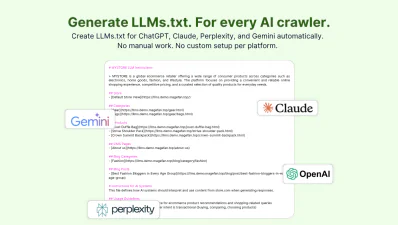
Magento 2 LLMs TXT Generator is an automatic AI visibility tool that helps you to generate an llms.txt file for Magento and improve AI visibility for ChatGPT, Perplexity, Gemini, Claude and other LLMs. It allows you to choose what products, categories, CMS or blog pages to include in the file and adds brand information along with any custom data.
Get full control over the data shared in LLMs.txt, set how often to update the file and create separate llms.txt files for all store views.
Prepare your store for AI search, improve AI visibility, get more traffic from LLMs and make your content more structured for AI retrieval.







Why is LLMs.txt Important in Magento?
For complex Magento websites with deep category hierarchies and thousands of products XML sitemap is usually enough for the structure. But only for traditional search engines. AI models work differently. They extract and synthesise information based on topical clusters, clear brand definitions, and explicitly stated relationships between products and categories.
LLMs.txt in Magento helps you define those relationships intentionally. e.g. instead of forcing AI tools to understand what your brand is about from scattered content, you state it explicitly. Through specific categories, products, CMSP pages and other resources in the LLMs.txt file.
How to Generate LLMs.txt File in Magento?
There are two main ways to create an LLMs.txt file for Magento: manually and using the Magefan Extensions for LLMs TXT and SEO. The right approach depends on the size of your store, the technical expertise you have and how many pages you want to add to LLMs.txt.

Option 1: Create LLMs.txt in the admin panel (manually)
This approach works best for marketers or store owners who want quick access to the LLMs.txt file and extended editing options. You can add llms.txt this way using the Magefan .
Navigate to Stores > Configuration > Magefan Extensions > SEO > AI SEO and paste the content for your LLMs txt in the Instructions for llms.txt File text field. Once you save the settings, LLMs.txt file becomes available via the following path — https://yourstore.com/llms.txt.
Option 2: Generate and update LLMs.txt automatically
If you want to create llms.txt for Magento automatically and auto-update it as your store changes, use Magefan LLMs TXT Generator. Then just navigate to Stores > Configuration > Magefan Extensions > LLMs TXT, add products, choose what product information to include, and the number of pages to include.
Here you can also configure the cron schedule settings to auto update the llms.txt file on a daily, monthly or weekly.
Features of the Magento 2 LLMs TXT Generator
Magento LLMs TXT Generator makes it easier to manage llms.txt file through automation, extensive page control and auto-updates.
Improve AI Visibility for Magento
Traditional search behaviour has shifted to AI systems like ChatGPT, Perplexity, Claude and Gemini. Which means you have to shift your approaches to getting discovered.
LLMs.txt file helps you to structure your website content, so it includes the most accurate, relevant and complete information for AI crawlers to retrieve, index and cite.
Magento LLMs TXT Generator helps you to summarise your most important content in an AI-readable file so AI systems can understand and recommend your brand better.
Generate LLMs TXT for Magento Automatically
LLMs TXT Generator for Magento creates a structured AI-readable LLM.txt file with relevant content about your website and brand.
You have full control over what gets into the file, so you can improve your positioning and prepare your store for AI comprehension and crawling.
Once generated, LLM.txt is added to your Magento root, where AI crawlers can retrieve and crawl it. Set it once and let the extension run on its own — no editing, no reuploading, no exports.
Add Pages to LLMs TXT — From Products to Blog
LLMs.txt is not a sitemap. It shouldn’t contain every page in your store. Just the most relevant ones that help AI understand your brand and products better.
The Magento 2 LLMs TXT Extension gives you entity-level control to add unlimited:
- - Products
- - Categories
- - CMS pages
- - Blog pages
- - Custom pages
- - Brand information
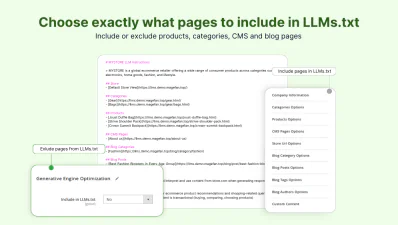
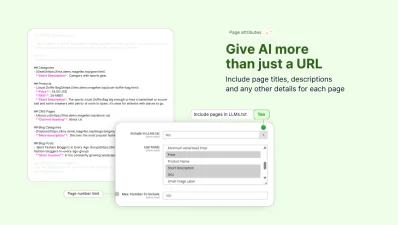
Choose what pages and page attributes to include in the llms.txt, set page limits or exclude specific pages on the page-level.
Auto-update LLMs TXT File to Keep it Relevant
Make sure your store is always up-to-date for AI search with llms.txt cron auto-updates.
Define exact hour, minute and second for llms.txt regeneration on your own schedule — daily, weekly or monthly.
Magento LLMs TXT Generator cron makes sure AI platforms get data about new items or updated product information consistently.
Create LLMs TXT for Every Store View
With the Magefan LLMs TXT Generator for Magento, every store view has its own AI-readable file — with its own rules, content scope, limits and brand information.
Content from each store view is scoped properly, never mixed.
Help AI crawlers understand the regional content of each store view and get cited in multiple languages.
Include Information about Your Brand for AI Crawlers
The llms txt file in Magento is not just a list of URLs. It’s a hub that helps AI systems understand your brand identity, positioning, products etc.
Provide AI with additional context about your brand by adding the following information about your brand:
- - Company name
- - Company description
- - Additional information
Improve AI-driven search experiences and control what AI engines retrieve and tell about your brand.
Best Practices and Tips for LLMs.txt File in Magento
Creating LLMs.txt file in Magento is relatively simple. Optimising and maintaining is where most stores gain or lose the advantage. We already know that AI systems rely on clarity, structure and context. That's why optimizing LLMs.txt for that defines how your store will be interreted in generative environments. Let's break down the best practices for that.
Structure llms.txt for AI, not search engines
Define your niche clearly
Keep LLMs.txt updated
FAQs
What is Magento LLMs TXT File Generator?

How often does the Magento llms.txt file get updated?
How does the LLMs extension generate the llms.txt file?
If you want to add specific pages to the file, enable the Include in llms.txt option in the Generative Engine Optimisation section on the page level.
Can I control which products and categories are included in LLMs.txt?
Will LLM.txt affect my existing SEO settings or robots.txt?
Does it work with Magento multi-language setups?
How to install Magento 2 LLMs TXT Generator?
Alternatively can upload an extension archive to your Magento folder and run compost updates commands.
Can I exclude certain pages from my LLMs.txt file?
Should LLMs.txt be linked anywhere on my site?
How do LLMs.txt files work with multi-store or multi-language Magento setups?
