

Magento 2 Agentic Commerce | ACP for Magento | Agentic Checkout
Magento 2 Agentic Commerce is an extension that enables AI-assisted shopping for Magento and allows AI assistants like ChatGPT, Claude, Pexplecity, Gemini and AI browser tools to browse your catalogue, compare prices, build shopping carts and send users to your store for checkout or purchase items for customers within conversations (if the AI assistant supports UCP Checkout). The module publishes a UCP merchant profile, MCP Server, WebPMCP, llms.txt file, agent discovery sitemap, store policies and an agent block in robots.txt on your store to ensure fast discovery and compliance with the agentic commerce standard.
Magento ACP Extension tracks all agent activity on your stores, including searches, carts by status, and agentic orders, in an extensive Agentic Commerce dashboard and protects your store from bots with rate limiting, cart limits and lifetimes and signed checkout requests.



Why Do You Need the Agentic Commerce Extension in Magento?
Shoppers are actively asking AI assistants to recommend and compare products, and assistants list stores they can easily browse, read and transact with. Magento Agentic Commerce integration makes that possible by adding a relevant UCP tool to your store to improve Agentic browsing, and allows all AI agents to create carts and complete checkouts.

Enable Agentic Browsing
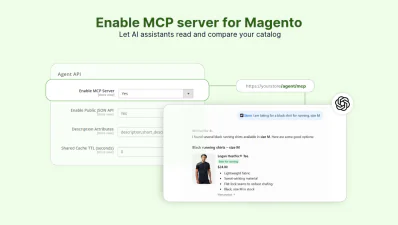
Create Magento 2 MCP Server
Enable AI-Assisted Shopping
Improve Discovery in LLMs
Prepare Your Store for AI Commerce with Magento 2 Agentic Commerce Solution
Magefan Agentic Commerce Extension prepare your Magento store for AI shopping with industry-standard protocols, discovery files, carts, checkout and security protocols. The agent endpoints, WebP MCP and agent carts are enabled as soon as you enable the module.
Prepare for AI-Assisted Shopping in Magento
Give AI platforms everything they need to connect to your store and understand it using industry standards.
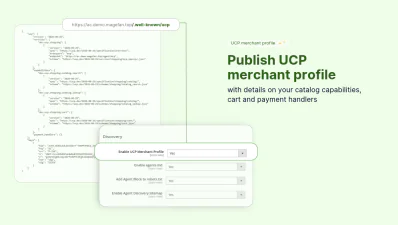
- - Universal Commerce Protocol - publish (UCP) merchant profile with your MCP server, payment handlers, capabilities and public signing key via /.well-known/ucp.
- - MCP server - allows AI agents to read policies, browse products and create carts once users add them via selected AI assistant plugins.
- - WebMCP - allows AI browsers to search, add to cart, sign up for newsletters, sign in, and create accounts with marketing forms and 8 in-page tools.
- - Store policies - let AI agents request and read CMS pages for shipping terms, return policies, privacy policy, and FAQs to answer customer questions.
Ensure Easy Information Discovery by AI Agents
Tell AI agents where they can connect to your store and what they can do with the Magento 2 Agentic Commerce Extension.
The /agent.md shares all your endpoints, store policies and pages as the llms.txt file generated by the Magefan LLMs TXT Generator.
The agent discovery sitemap lists every agent endpoint, including product.json and search.json, in one file /sitemap_agentic_discovery.xml. And the agent block in robots.txt lists all your UCP profiles, MCP server and agents.md.
Enable Agentic Carts for Magento
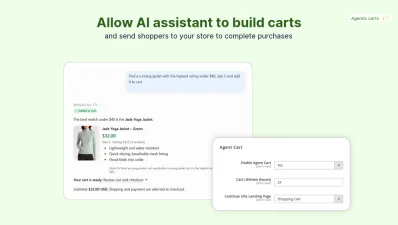
Allow AI agents to build carts directly in the conversation with a link to continue checkout on your store, as your customers are used to.
Direct shoppers to the shopping cart or checkout pages with all the items agents added. The agent's cart is just a guest cart. No shipping or payment details are sent to the agent.
Magefan AI Commerce module keeps the carts for 24 hours (by default) and credits each order to the agent in extended reports.
Set up Magento Agentic Checkout
Magento 2 Agentic Commerce lets AI platforms that support UCP complete purchases inside the chat.
Share shoppers' emails and addresses, along with your payment and shipping methods, with AI assistants, and let customers pay with Google Pay.
The card is charged through your Stripe or Braintree accounts. No cart numbers are stored on your store.
Ensure Safe Agentic Shopping
Keep all agent endpoints safe and fast with the built-in security controls to keep bot agents from exploiting your agentic storefront.
- - Rate limiting - limit requests per minute (60s) from one IP across all endpoints.
- - Cart limits - limit new carts per IP per hour, so bots can’t spam your database.
- - Allowed browser origins - reject MCP browser requests from other websites and keep only allowed sources.
- - Signed responses & requests - accept checkout requests only when they carry RFC 9421 (ES256) signatures from a key that sits on a public UCP profile.
The MCP server, discovery files and JSON API don’t start PHP sessions, so bot traffic doesn’t fill your session storage.
Monitor AI Agent Activity and Agentic Orders in Magento
Magefan Agentic Commerce Extension provides extensive insights into AI agents' activity on your store. The report shows details about each agent, the queries they search for and how much revenue they bring.
View What Agents Do on Your Store
Follow every AI assistant on your store from the first search or discovery request to the cart and final order.
Magento 2 ACP dashboard offers detailed funnel tracking: catalog searches, product views, created carts and stated checkouts for different periods of time.
Track carts, orders, revenue, searches, and views for each assistant in the Agents reports and investigate a specific visit or error in Activity Logs.
Track Magento Agent Cart Activities
Monitor every cart that agents created from the moment they create a cart link to customers completing checkout.
Get details on agents, cart statuses, items added, orders and see exactly what happens with each cart:
- - Open (agent) - the agent works with the cart and can still change it.
- - Opened by shopper - the user opened a cart link from the AI conversation.
- - Ordered - the shopper placed an order, and there is an order number for it .
- - Cancelled or expired - the agent cancelled a cart or the cart lifetime expired after a specified period.
Monitor Orders and Revenue
See exactly how much revenue AI agents bring to your store in a dedicated Magento Agentic Commerce dashboard.
Compare agent requests, unique agents, carts created, orders, cart-to-order conversion and revenue generated within specific periods and store views.
Track agentic orders by agent, order ID, date, store view and view items purchased in a separate Agentic Orders grid.
Track Agent Searches and Queries
Get insights about what customers are looking for in your store by tracking AI agent search queries.
Filter searches that return no results to find demand you’re not covering in your store.
Use Magento 2 Agentic Commerce to improve titles and descriptions, and add new products for AI visibility.
FAQs
What is Agentic Commerce, and do I actually need it?

You need Agentic Commerce integration for Magento to make your products discovered and bought inside AI assistants. Without it, AI agents can’t build a cart and place an order.
What agents does Magento Agentic Commerce Extension support?
What MCP tools does this extension support in /agent/mcp?
- - Search_catalog - with text, category, price ad sorting.
- - Lookup_catalog - up to 50 products by ID, variant ID and SKU.
- - Get_product - with full product details, images, categories, variants and custom options.
- - Get_store_policies - for returns, terms, privacy policy, shipping and FAQs.
- - Create_cart, get_cart, udpate_cart and cancel_cart - for building carts.
- - Create_checkout, get_checkout, update_checkout, complete_checkout and cancel_checkout - for UCP checkout.
What tools does Magento WebMCP support for storefront?
- - Search_product - by text, price, category, or sorting.
- - Get_product_details - read description, variants, custom options with stock and prices.
- - Get_store_policies - read all store policies.
- - Add_to_cart, get_cart, udpate_cart and remove_from_cart to manage cart and minicart.
- - Open_cart - to go to checkout from the cart page.
With WebMCP, users always place orders on your checkout.

